SEO
What Is a Service Area Business (SAB)?
Service area business (SAB) stands for Service Area Business.
A service area business (SAB) is a business that travels to or delivers to its customers instead of serving them at its own address, such as a plumber, cleaner or mobile mechanic. Google lets these businesses list service areas instead of a public address.
What a service area business means in plain English
Google's Business Profile help sorts local businesses into three types. A storefront serves customers at its address. A service area business visits or delivers to customers and does not serve them where it is based. A hybrid business does both, such as a garden center that also delivers and plants, and can show its address alongside its service areas.
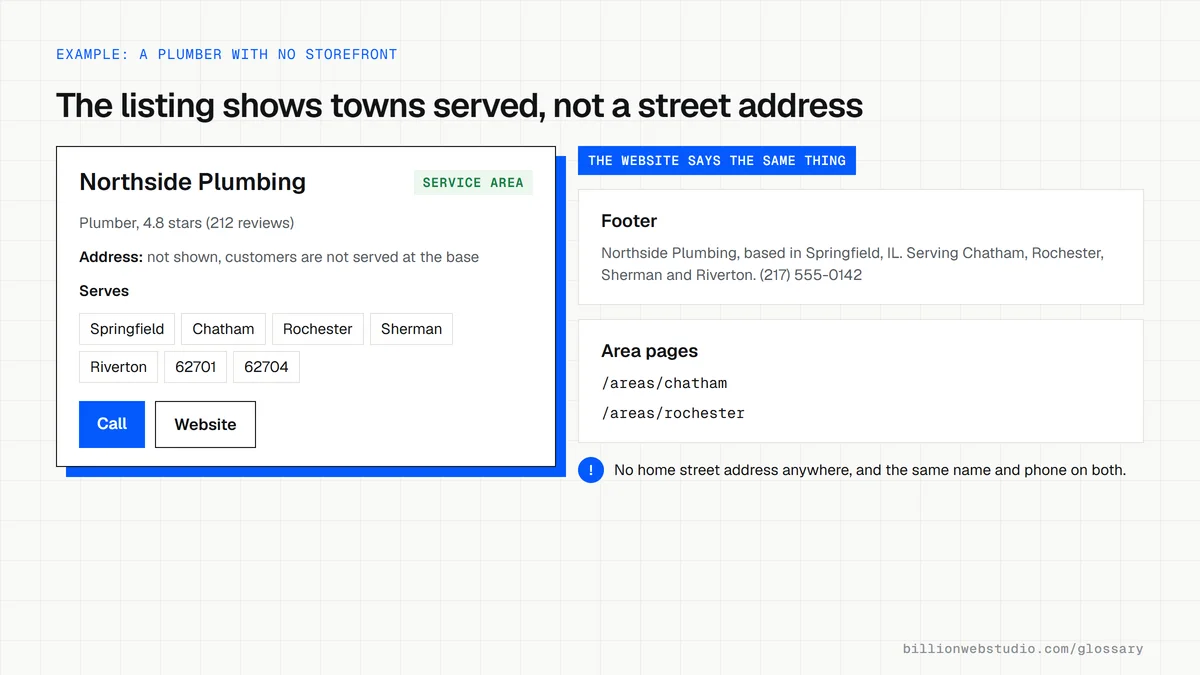
For an SAB, Google's guidance is to remove the address from the profile and enter service areas instead. A profile can list up to 20 areas, set as cities, postal codes or regions rather than a radius, and Google advises that the whole area should stay within about two hours of driving time from where the business is based.
Why service area business setup matters for leads
Getting the type wrong causes real trouble. A home-based electrician who shows a street address may have strangers turning up at the door, and Google's guidelines say to clear an address from the profile when customers are not served there. Listing a virtual office or mail drop to look local breaks the same guidelines and puts the whole profile, and the calls it brings, at risk.
A service area business example
A pest control company runs from the owner's home and covers one county. Its Business Profile shows no address and lists the eight towns it serves. Its website matches that setup: a page for each town with real local detail, such as the pests most often treated there, a phone number in the header, and LocalBusiness structured data that names the towns with the schema.org areaServed property.
Common service area business mistakes
- Showing a home address on the profile when customers never visit it.
- Setting a service area far wider than the team can reach in about two hours.
- Copying one area page many times with only the town name swapped, instead of writing about each place.
- Using a virtual office or coworking desk as an address to appear local in a town.
- Leaving the website silent about where the business works, so visitors and Google must guess.
Copy this LocalBusiness markup for a service area business
<script type="application/ld+json">
{
  "@context": "https://schema.org",
  "@type": "Plumber",
  "name": "Northside Plumbing",
  "url": "https://www.example.com/",
  "telephone": "+1-217-555-0142",
  "address": {
    "@type": "PostalAddress",
    "addressLocality": "Springfield",
    "addressRegion": "IL",
    "postalCode": "62701",
    "addressCountry": "US"
  },
  "areaServed": [
    { "@type": "City", "name": "Springfield" },
    { "@type": "City", "name": "Chatham" },
    { "@type": "City", "name": "Rochester" },
    { "@type": "City", "name": "Sherman" }
  ]
}
</script>
How to check your service area business setup on Google
- Search your business name on Google while signed in to the account that manages the profile, then click Edit profile.
- Open Location and look at Business location: if customers never visit you there, turn off the setting that shows the address to customers and save.
- Next to Service area, click Edit and confirm the list holds no more than 20 cities or postal codes, all within about 2 hours of driving from your base.
- Open your website footer and contact page and check they name the areas you serve without printing the street address the profile hides.
- Compare the business name and phone number on the website, the profile and your main directory listings, and fix any that differ.
What good looks like: The profile shows service areas and no street address, those areas match the towns named on your website, and the name and phone are identical everywhere. Google says approved service area edits can take up to 48 hours to appear.
Free tool: Business Profile Help: Manage your service areas
Questions to ask your web developer
“How will the website show where we work without printing our home address?”
A good answer: The town or region goes in the footer and contact page, each main area gets a page with real local detail, and the structured data lists the areas with areaServed while the address carries only the town, region and postal code.
“Will you create a page for every town on our list?”
A good answer: Only for towns with something real to say, such as jobs done there or local rules. Pages that would differ only by the town name are merged into one areas page instead.
Service area business (SAB): common questions
How many service areas can I add to a Google Business Profile?
Google allows up to 20 service areas on a Business Profile, entered as cities, postal codes or other named areas. Google advises keeping the overall area within about two hours of driving time from the business's base, and service areas cannot be drawn as a simple radius around an address.
Should a service area business show its address on its website?
Not if customers are never served there. A website can name the town or region you are based in and the areas you cover without printing a home street address. Keep the business name and phone number identical to the Business Profile, since matching details help customers and search engines trust the listing.
What is a hybrid business on Google?
A hybrid business serves customers at its own address and also travels to or delivers to them, like a restaurant that delivers or a tire shop with a mobile fitting van. Google lets a hybrid business show its storefront address and set service areas on the same Business Profile.
Sources
- Google Business Profile Help: Manage your business address and service area
- Google Business Profile Help: Edit your service area
- Google Business Profile Help: Guidelines for representing your business on Google
- Schema.org: areaServed
- Business Profile Help: Add, edit, or remove your address
- Google Search Central: Local business structured data
- schema.org: Plumber
Want a website that gets this right?
Every Billion Web Studio build includes technical SEO, schema and speed work as standard, with a fixed quote within 1 business day.