Building and hosting
What Is Vercel?
Vercel is a cloud platform for building, deploying and hosting websites and web applications. Vercel connects to a code repository, builds the site on every change, gives each change its own preview link and serves the live site through a global CDN.
What Vercel means in plain English
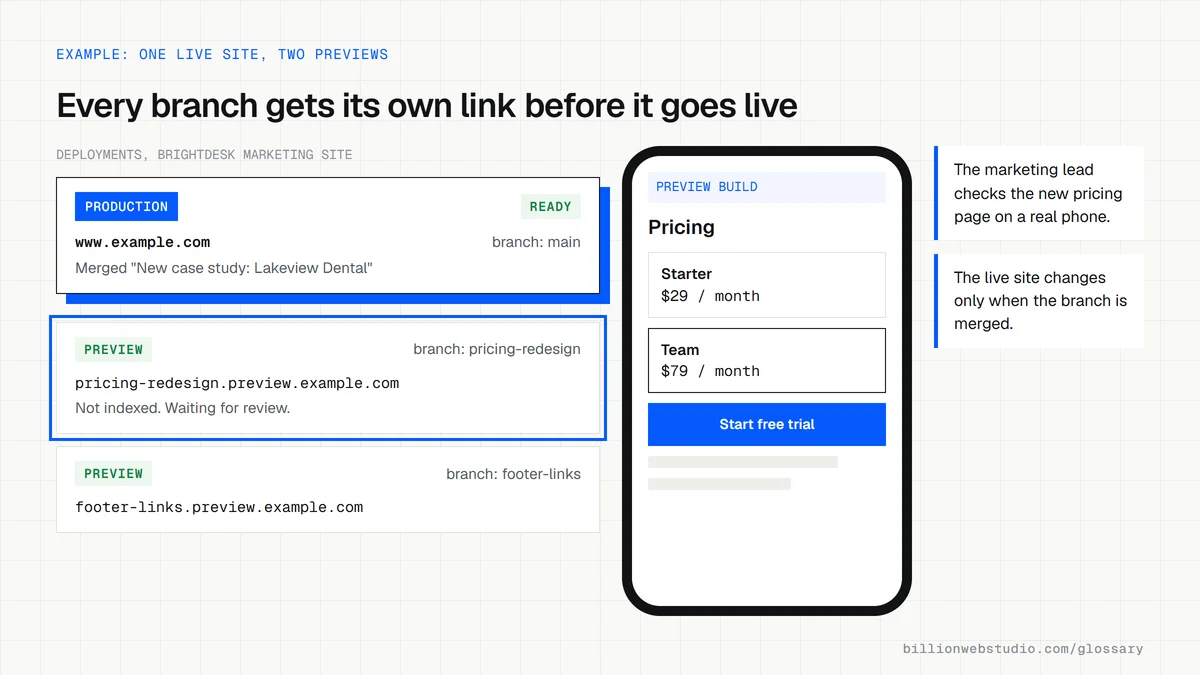
Vercel takes the code for a website from a repository on GitHub, GitLab or Bitbucket, builds it and publishes it, with no server for your team to manage. Every push to the main branch updates the live site, while every other branch or pull request gets its own preview deployment at a separate URL. Vercel is the company that maintains Next.js, and its documentation says it also supports more than 40 other frameworks.
Around that core, Vercel adds the parts a modern site needs: a CDN that caches pages close to visitors, Functions that run server-side code on demand, image optimization, custom domains with automatic SSL certificates, a web application firewall and instant rollback to a previous deployment.
Why Vercel matters for a business website
The preview link is the feature owners notice most. Before a change goes live, you can open the exact build on your own phone, check the copy and click through forms. If a release causes a problem, the team can roll back in moments without a rebuild.
Plans matter too. Vercel's documentation, checked in October 2026, says the free Hobby plan is restricted to non-commercial, personal use, so a business website belongs on a paid plan. The Pro plan lists a $20 monthly platform fee that includes one deploying seat and $20 of usage credit, with extra usage billed on demand.
A Vercel example
A B2B software company runs its marketing site in Next.js on Vercel, with page content in a headless CMS. When a marketer publishes a new case study, the CMS sends a webhook that triggers a fresh build. When a developer redesigns the pricing page on a separate branch, Vercel posts a preview link in the pull request, the marketing lead reviews it on desktop and mobile, and the change goes live only after the branch is merged.
Common Vercel mistakes
- Running a commercial website on the Hobby plan, which Vercel limits to personal, non-commercial use.
- Keeping the Vercel project in a developer's personal account instead of a team account the business owns.
- Pointing a custom domain at a preview branch, which removes the noindex header Vercel adds to previews by default.
- Storing API keys in the code instead of in Vercel's environment variables.
- Ignoring usage limits and spend settings until an unexpected traffic spike shows up on the bill.
Vercel Hobby vs Pro for a business website
| What matters | Hobby | Pro |
|---|---|---|
| Commercial use | Not allowed: non-commercial, personal use only | Allowed |
| Monthly cost | Free | $20 platform fee, including 1 deploying seat and $20 of usage credit |
| Extra people who can deploy | No team collaboration features | $20 per month per seat, with free read-only Viewer seats |
| Deployments per day | 100 | 6,000 |
| Instant Rollback | To the previous deployment only | To any earlier production deployment |
| Runtime logs kept | 1 hour | 1 day |
| Spend management | Not available | Budget with alerts at 50, 75 and 100 percent and an optional pause |
| Firewall custom rules | Up to 3 | Up to 40 |
How to check your Vercel setup is right for a business site
- Open the Vercel dashboard and use the team switcher to see which team holds the project. It should be a team in the business's name, not a developer's personal Hobby account.
- In that team, open Settings, then Billing, and confirm the plan reads Pro or Enterprise.
- Open Members in the same Settings area and check that at least one person at your business has the Owner role.
- Open the project, then Settings, then Domains, and confirm your main domain is assigned to production rather than to a preview branch.
- Back in the team's Billing settings, confirm Spend Management is on with an On-Demand Budget you chose, and decide whether Pause Production Deployments should be enabled.
- On the project overview, find the Production Deployment tile and make sure someone on your side knows where its Instant Rollback button is.
What good looks like: A Pro team owned by the business with a business Owner, the domain on production, a spend amount set with alerts at 50, 75 and 100 percent, and a rollback path that more than one person knows.
Free tool: Vercel Docs: Hobby plan and plan comparison
Questions to ask your web developer
“Which Vercel team owns the project, and who holds the Owner role?”
A good answer: The project sits in a team in the business's name, someone at the business is an Owner, and the agency works as a Member that can be removed without moving the project.
“How do we roll back a bad release, and who can do it?”
A good answer: They point to Instant Rollback on the production tile, name who can run it, and mention that a rollback turns off automatic production deploys until it is undone.
“What spend amount and pause setting have you configured?”
A good answer: An On-Demand Budget is set in Billing, alerts go to the right people, and you have agreed whether Pause Production Deployments is on, knowing it takes the site offline with a 503 when the amount is reached.
Vercel: common questions
Is Vercel a web host?
Yes, among other things. Vercel serves your site to visitors like a web host, but it also builds the code from your repository, creates preview deployments for every change, runs server-side functions and caches pages on its CDN. You do not rent or manage a server yourself.
Is Vercel free for business websites?
No. Vercel's Hobby plan is free, but its documentation states that the plan is restricted to non-commercial, personal use. A business site should run on a paid plan such as Pro, which as of October 2026 starts with a $20 monthly platform fee, plus any usage beyond the included credit.
Is Vercel only for Next.js sites?
No. Vercel maintains Next.js and supports it with zero configuration, but its documentation lists support for more than 40 frameworks. Sites built with other JavaScript frameworks, or plain static HTML, can also be deployed on Vercel.
Sources
Want a website that gets this right?
Every Billion Web Studio build includes technical SEO, schema and speed work as standard, with a fixed quote within 1 business day.