Building and hosting
What Is a Webhook?
A webhook is an automatic message that one online system sends to another the moment an event happens, such as a payment succeeding or an order being placed, by posting the event details to a web address the receiving system provides.
What a webhook means in plain English
Think of the difference between calling a shop every hour to ask whether your order has arrived and leaving your number so the shop calls you. Asking repeatedly is polling. Leaving your number is a webhook. You register a URL, called an endpoint, with a service, and when a chosen event occurs, the service sends an HTTP POST request to that URL with the details, usually as JSON.
Shopify describes webhooks as a performant alternative to continuously polling for changes. Payment providers, ecommerce platforms, form tools, CRMs and booking systems all use them to tell your website, or another app, that something has just happened.
Why webhooks matter for a business website
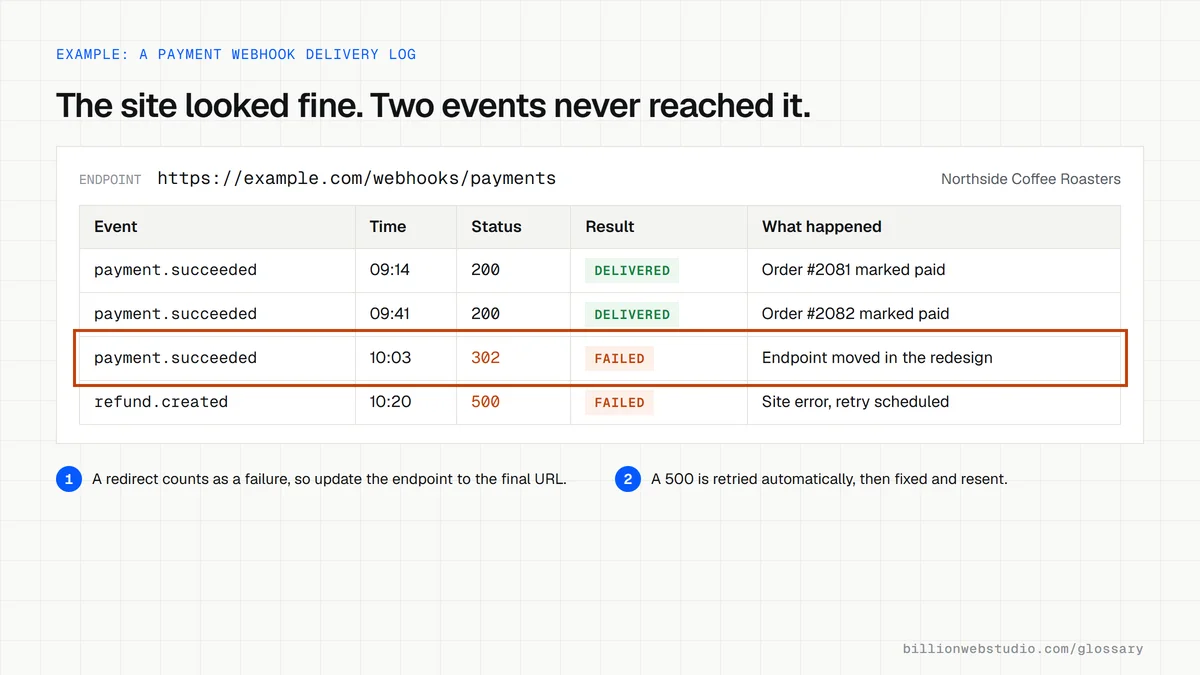
Webhooks are the wiring behind many things owners take for granted: a paid order marked as paid, a new lead appearing in the CRM within seconds, a stock level updating after a sale, a confirmation email going out after a booking. When a webhook fails, nothing looks broken on the website itself. The customer sees a thank-you page while the order, lead or booking never reaches the system that should act on it.
A webhook example
A customer pays on an online store that uses Stripe. Stripe sends a payment succeeded event to the store's webhook endpoint, and the store marks the order as paid and starts fulfillment. Stripe's documentation says the endpoint must return a success status quickly, should verify the Stripe-Signature header to confirm the message is genuine, and that in live mode Stripe retries failed deliveries for up to three days with exponential backoff.
Common webhook mistakes
- Accepting webhook messages without checking the signature, so anyone who finds the URL can send fake orders or payments.
- Processing the same event twice because a retry arrived, for example sending two receipts for one sale.
- Assuming events arrive in order, when Stripe states it does not guarantee delivery order.
- Moving or redirecting the endpoint during a redesign, since Stripe treats a redirect response to a webhook as a failure.
- Having no alert or reconciliation job, even though Shopify notes that webhook delivery is not always guaranteed.
What a failed webhook delivery status means and how to fix it
| Status shown | What it means | Usual fix |
|---|---|---|
| 3xx redirect | The endpoint URL now redirects, often after a redesign or a move to https, and Stripe treats any redirect as a failure | Register the final URL the redirect points to |
| 401, 403 or 405 | A login wall, firewall rule or wrong HTTP method is refusing the POST request | Make the endpoint public and accept POST |
| 404 | The endpoint URL no longer exists | Restore the route or register the new URL |
| 5xx | The site received the event but failed while processing it | Read the application logs for the error |
| TLS error | The HTTPS certificate or its chain is invalid. Stripe requires TLS 1.2 or higher | Fix the certificate and retest it with an SSL checker |
| Timed out | The endpoint did slow work before replying | Return a 2xx at once and process the event in a queue |
Copy this sample webhook payload to test an endpoint
{
  "id": "evt_20261022_0001",
  "type": "booking.confirmed",
  "created": "2026-10-22T14:05:31Z",
  "data": {
    "booking_id": "bk_48213",
    "service": "Furnace tune-up",
    "starts_at": "2026-10-29T09:00:00-05:00",
    "customer": { "name": "Jordan Lee", "email": "jordan@example.com" },
    "total": 129.00,
    "currency": "USD"
  }
}
How to check your payment webhooks are being delivered
- In the Stripe Dashboard, open Workbench, select the Webhooks tab and click your endpoint.
- Open the Event deliveries tab and look for anything marked Failed. Each event is listed as Delivered, Pending or Failed.
- Click a failed event and read its HTTP status code, then match it to the fixes in the table on this page.
- Once the cause is fixed, open the event and click Resend. The Dashboard allows this for up to 15 days after the event was created.
- Compare last week's successful payments in Stripe with paid orders on your site or in your CRM. The two counts should match.
What good looks like: Every recent event shows Delivered with a 2xx status, nothing stays Pending for long, and payments match orders one to one. Shopify, form tools and CRMs keep similar delivery logs in their developer or notification settings.
Free tool: Stripe Docs: Receive events in your webhook endpoint
Questions to ask your web developer
“How does our endpoint confirm that a message is genuine?”
A good answer: It verifies the sender's signature with a signing secret kept in server environment variables, rejects messages with old timestamps (Stripe's libraries default to a 5 minute tolerance), and the secret can be rolled without downtime.
“What happens if the same event arrives twice, or out of order?”
A good answer: The handler records every processed event ID and skips repeats, and it looks up the current state of the order instead of assuming events arrive in sequence.
“Who is alerted when deliveries fail, and how are missed events caught?”
A good answer: A named person gets an alert on failed deliveries, and a scheduled job compares records between the provider and your systems so anything missed is replayed.
Webhook: common questions
What is the difference between a webhook and an API?
With an API, your system asks another service for data when it needs it. With a webhook, the other service pushes data to your system as soon as an event happens. Many integrations use both: a webhook announces the event, then an API call fetches any extra details.
Are webhooks secure?
They can be, if set up properly. The endpoint should use HTTPS, verify a signature the sender adds to each message, such as Stripe's Stripe-Signature or Shopify's HMAC header, and ignore duplicate deliveries. An unprotected endpoint can be fed fake events by anyone who learns its URL.
What happens if a webhook fails?
Most providers retry. Stripe, for example, retries failed live-mode deliveries for up to three days and lets you resend events from its dashboard. If the endpoint stays down longer, events can be missed, which is why important integrations also run periodic checks that compare records between systems.
Sources
Want a website that gets this right?
Every Billion Web Studio build includes technical SEO, schema and speed work as standard, with a fixed quote within 1 business day.