Building and hosting
What Is a Web Server?
A web server is the software, and the computer running it, that stores a website's files and sends them to visitors' browsers over HTTP or HTTPS whenever someone requests a page, image or other resource.
What a web server means in plain English
The term covers two things. On the hardware side, MDN describes a web server as a computer connected to the internet that stores web server software and a site's files, such as HTML, images, CSS and JavaScript. On the software side, the core part is an HTTP server: a program that understands web addresses and the HTTP protocol, accepts a browser's request, finds the file and sends it back, or returns a 404 if it cannot.
Common web server software includes Apache HTTP Server, Nginx, Microsoft IIS and LiteSpeed. A web server is not the same as web hosting: hosting is the service you pay for, and the web server is the machine and software that service runs for you.
Static and dynamic web servers
A static web server sends stored files exactly as they are. That suits sites made of prebuilt pages and is very quick. A dynamic web server adds an application server and usually a database, so each page can be assembled when it is requested, for example to show the latest blog posts, a logged-in customer's orders or live stock levels. Most CMS-based sites, including WordPress, run on a dynamic setup.
Why the web server matters for a business website
Every visit starts with the web server. If it responds slowly, every page feels slow, however well the design is optimized. If it goes down, the site is offline and leads stop. The server also controls redirects, HTTPS certificates, caching rules and the status codes search engines read, so a misconfigured server can quietly send crawlers errors while the site looks fine in your own browser.
How to check the web server behind your site
- Open your browser's developer tools, reload a page and check the Network tab for the status code and response time of the first request.
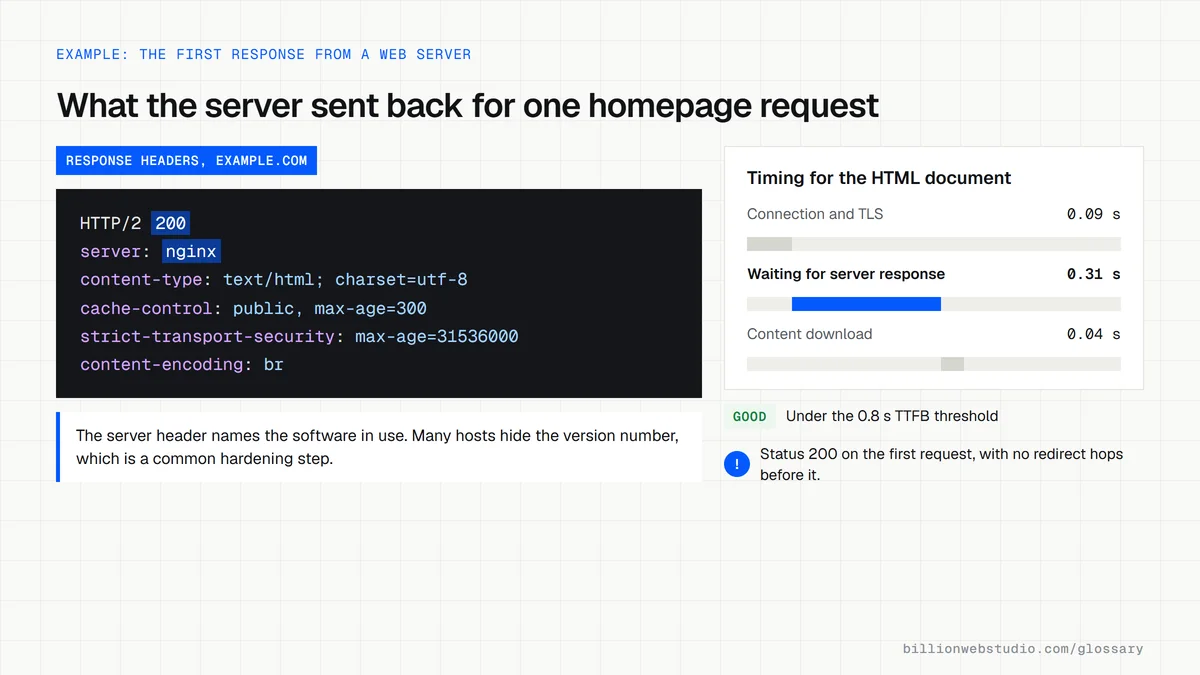
- Look at the response headers, where many servers name their software in a Server header.
- Ask your host or developer which server software and version runs the site and when it was last updated.
- Test that old URLs return a single 301 redirect and that missing pages return a real 404 status.
- Set up uptime monitoring so you hear about outages before customers do.
Copy this Nginx server block for HTTPS and redirects
# /etc/nginx/sites-available/example.com
# 1. Plain HTTP on either name: one 301 to the https www address
server {
    listen 80;
    server_name example.com www.example.com;
    return 301 https://www.example.com$request_uri;
}
# 2. Bare domain over HTTPS: one 301 to www
server {
    listen 443 ssl;
    server_name example.com;
    ssl_certificate     /etc/letsencrypt/live/example.com/fullchain.pem;
    ssl_certificate_key /etc/letsencrypt/live/example.com/privkey.pem;
    return 301 https://www.example.com$request_uri;
}
# 3. The live site
server {
    listen 443 ssl;
    server_name www.example.com;
    ssl_certificate     /etc/letsencrypt/live/example.com/fullchain.pem;
    ssl_certificate_key /etc/letsencrypt/live/example.com/privkey.pem;
    root /var/www/example.com;
    server_tokens off;   # do not reveal the nginx version
    error_page 404 /404.html;
    location = /old-services { return 301 /services/; }
    location / { try_files $uri $uri/ =404; }
}
How to check your web server's response time in Chrome
- Open the page in a Chrome incognito window, press F12 (Cmd+Option+I on a Mac) and select the Network tab.
- Reload the page and click the first row in the list, which is the HTML document itself.
- Open the Timing tab and read Waiting for server response (older Chrome versions label it Waiting (TTFB)). Reload three times and note the typical value.
- Switch to the Headers tab and note the status code, the server header and the cache-control header the server sent back.
- Run the same URL in PageSpeed Insights and read Time to First Byte in the field data, which reflects real visitors rather than your own connection.
What good looks like: Google's web.dev guidance rates a TTFB of 0.8 seconds or less as good and anything above 1.8 seconds as poor. The document should answer 200 directly, with no chain of redirects in front of it.
Free tool: PageSpeed Insights
Questions to ask your web developer
“Who applies security updates to the web server, and how quickly?”
A good answer: A named person or the host's managed service applies security releases within a written time frame and keeps a log of what was updated and when.
“What is our time to first byte for real visitors, and what will you do if it is slow?”
A good answer: They quote field TTFB from PageSpeed Insights against the 0.8 second threshold and name concrete fixes such as full-page caching, a CDN or a larger server plan.
“Where are the server's redirect and caching rules kept?”
A good answer: In version-controlled configuration files or a documented host panel, so the rules survive a migration and every change can be reviewed and rolled back.
Web server: common questions
Is a web server hardware or software?
Both, depending on context. The hardware web server is the computer that stores a website's files and connects to the internet. The software web server is the program on that computer, such as Nginx or Apache, that receives browser requests over HTTP and sends back the right files.
What is the difference between a web server and web hosting?
A web server is the computer and software that delivers website files to browsers. Web hosting is the service of renting space and resources on web servers run by a provider, usually with support, backups and security included. When you buy hosting, you are paying someone else to run the web server.
What are examples of web server software?
Widely used web server programs include Apache HTTP Server, Nginx, Microsoft IIS and LiteSpeed. Many modern platforms hide the web server entirely, so a site on a managed host or a deployment platform still uses one, but the provider configures and maintains it for you.
Sources
Want a website that gets this right?
Every Billion Web Studio build includes technical SEO, schema and speed work as standard, with a fixed quote within 1 business day.