Working with an agency
What Is a Website Care Plan?
A website care plan is a recurring service package, usually billed monthly, in which a developer or agency handles a site's routine upkeep, such as software updates, backups, security monitoring, uptime checks and a set amount of small content changes.
What a website care plan means in plain English
A care plan turns website maintenance into a product. Instead of hiring help each time something breaks, you pick a tier with a fixed list of tasks, a monthly price and a promised response time. The name is most common among WordPress agencies and freelancers, whose sites need frequent plugin and theme updates.
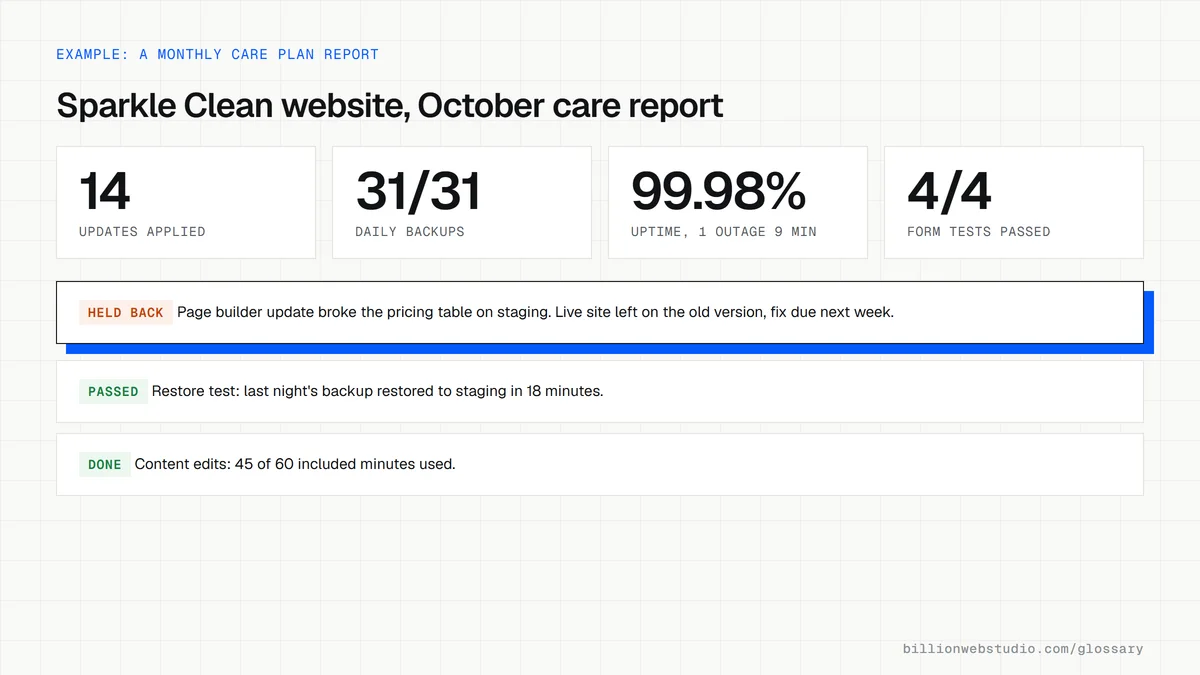
A care plan differs from a general retainer in how it is sold. A retainer usually reserves hours or access, while a care plan promises named tasks done on a schedule, often backed by a monthly report showing what was updated, backed up and checked.
Why a website care plan matters for a business
Most website failures are slow and silent: an outdated plugin that becomes a security hole, a form that stops sending, an SSL certificate that lapses. A care plan makes someone responsible for catching them. It also gives you a predictable cost and a known person to call, which matters most when the site goes down on a busy day.
A website care plan example
A cleaning company pays a monthly care plan for its WordPress site. Each week the provider tests plugin updates on a staging copy before applying them live, takes off-site backups and watches uptime alerts. Each month they test the quote form, fix broken links, make up to an hour of text and photo edits and send a one-page report. Larger requests are quoted separately.
What to check before signing a website care plan
- Get the list of included tasks in writing, with how often each one is done.
- Ask whether updates are tested on a staging site before they reach the live site.
- Check where backups are stored and how quickly the provider can restore the site.
- Confirm what counts as a small change and what happens to unused time each month.
- Make sure your business, not the provider, owns the hosting, domain and admin accounts.
- Look for a notice period that lets you cancel without losing access to the site.
What a care plan should do, and how to verify it
| Task | Common frequency | How you can verify it |
|---|---|---|
| Core, plugin and theme updates | Weekly, or as soon as a security fix is released | Dashboard > Updates shows nothing waiting |
| Off-site backups | Daily for sites that change often, weekly for static sites | Latest backup date in the report, plus a test restore |
| Uptime monitoring | Checks every few minutes, with alerts on downtime | Outage log in the monthly report |
| Security scan | Daily or weekly | Scan results and any cleanups listed in the report |
| Form and checkout tests | Monthly and after every update | Your own test submission arrives |
| Site Health and broken link review | Monthly | Tools > Site Health shows no critical issues |
How to check what your website care plan did this month
- Log in to WordPress and open Dashboard > Updates. It lists any WordPress, plugin, theme or translation updates still waiting.
- Open Plugins > Installed Plugins and look at the Automatic Updates column and any notice that a new version is available.
- Go to Tools > Site Health and read the Status tab. Critical issues are listed first, then recommended improvements.
- Ask the provider for the date and storage location of the latest backup, and once or twice a year ask them to restore it to a staging copy while you watch.
- Fill in your own contact form and confirm the message reaches your inbox.
- Compare what you found with the monthly report: the updates, backups and checks it claims should match what the dashboard shows.
What good looks like: No updates left waiting longer than the plan's update cycle, no critical issues in Site Health, a recent off-site backup that has been restored at least once in a test, and a working form.
Free tool: WordPress Site Health screen guide
Questions to ask your web developer
“How do you test updates before they reach our live site?”
A good answer: Updates go to a staging copy first, key pages and forms are checked there, and the live site is updated afterward, with a fresh backup taken just before.
“How long would a restore from backup take, and when did you last test one?”
A good answer: A stated restore time, backups kept away from the hosting server for a set number of days, and the date of the last test restore, which they can show you.
“What happens if a security problem is found on our site?”
A good answer: They say whether malware cleanup is included or billed, how fast they respond, and the steps they follow: isolate the site, clean it, fix the cause, reset passwords and report what happened.
Website care plan: common questions
What is included in a website care plan?
Most care plans cover core, theme and plugin updates, regular off-site backups, security scanning, uptime monitoring and a monthly report. Higher tiers may add a set amount of content edits, speed checks, SEO reporting or priority support. Details vary by provider, so compare the written task lists rather than the plan names.
Is a website care plan worth it?
It is worth it when nobody on your team will reliably apply updates, check backups and test forms every month. If someone in-house will, you may only need outside help for occasional larger jobs. Weigh the monthly fee against what one emergency fix or a hacked-site cleanup would cost you.
What is the difference between a care plan and website maintenance?
Website maintenance is the work itself: updates, backups, fixes and content changes. A care plan is one way to buy that work, as a fixed monthly package from an outside provider. You could also handle maintenance in-house, pay a freelancer per job, or cover it within a broader agency retainer.
Sources
Want a website that gets this right?
Every Billion Web Studio build includes technical SEO, schema and speed work as standard, with a fixed quote within 1 business day.