Building and hosting
What Is a Dynamic Website?
A dynamic website is a site whose pages are generated when a visitor requests them, usually by server code that pulls content from a database into templates, so one address can show updated or personalized content.
What a dynamic website means in plain English
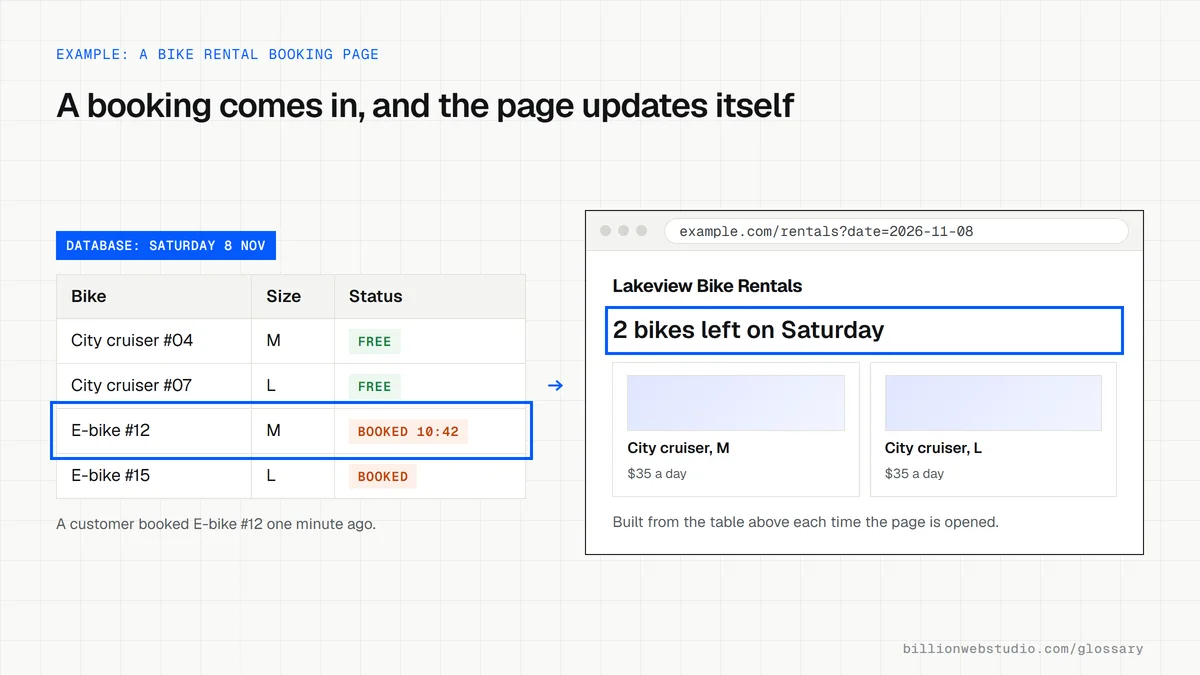
MDN describes a dynamic website as one where some of the response is created only when needed. In practice, a page template holds the layout, a database holds the words, prices and photos, and code on the server combines the two each time someone asks for a page. Change a record in the database and every page that uses it updates.
Most content management systems work this way. WordPress, for example, stores posts and pages in a database and assembles them through the active theme. Online stores, booking sites, member areas and search results pages are dynamic too, because what they show depends on stock levels, logins or what the visitor typed.
Why a dynamic website matters for a business
Dynamic sites let non-technical staff publish through a dashboard, and they make features possible that fixed files cannot offer: carts, account pages, filters, quote forms that check availability. For a business with a large catalog or frequently changing details, one template driven by data is far cheaper to maintain than hundreds of hand-built pages.
The price is more moving parts. Server code, a database and plugins all need updates and security patches, and building each page on request takes processing time. Good hosting and page caching close most of that speed gap, while regular maintenance keeps the extra attack surface under control.
A dynamic website example
A car dealership lists around 300 vehicles that change daily. Instead of a page per car built by hand, the site has one vehicle template and a database fed from the dealer's inventory system. When a truck sells, its listing drops out of search results and model filters automatically, and new arrivals appear within minutes with their own photos, price and specifications.
Common dynamic website mistakes
- Choosing a dynamic platform for a five-page site that will rarely change and never needs logins.
- Running without page caching, so the server rebuilds identical pages for every single visitor.
- Letting the core software, theme and plugins fall months behind on security updates.
- Skipping database backups because the hosting plan was assumed to include them.
- Allowing filters and search parameters to create thousands of near-identical URLs for search engines to crawl.
Static, dynamic or hybrid: which fits your site
| Approach | How pages are made | Good fit | Trade-off |
|---|---|---|---|
| Static | Built once into files and served as they are | Small brochure sites whose content rarely changes | Each edit needs a rebuild, and there are no logins or carts |
| Dynamic | Assembled from a database on every request | Stores, booking sites, member areas and large catalogs | More server work, updates and security patching |
| Dynamic with page caching | Built on the first request, then a saved copy is served | Most WordPress business sites with a blog and forms | The cache must clear when content changes |
| Hybrid | Marketing pages pre-built, personal or live pages built on request | Sites mixing marketing pages with accounts, search or live stock | Needs a developer used to modern frameworks |
How to check how fast your dynamic pages are built
- Run your homepage and a busy inner page through PageSpeed Insights and find Time to First Byte (TTFB) in the real-user data section.
- If there is no real-user data, open the page in Chrome, press F12, choose the Network tab and reload.
- Click the first row (the page itself), open the Timing tab and read Waiting for server response.
- Reload two or three times. If the number stays high every time, the server is probably rebuilding the page for every visitor without caching.
- Repeat on a page with filters or search results, which usually cannot be cached and shows the true server speed.
What good looks like: web.dev rates a TTFB of 0.8 seconds or less as good and anything above 1.8 seconds as poor. Cached pages should come in well under the good line.
Free tool: PageSpeed Insights
Questions to ask your web developer
“Which pages will be cached, and which must always be built fresh?”
A good answer: A clear list: marketing pages and posts cached, carts, accounts and search results never cached, and a rule that clears the cache when an editor publishes.
“What TTFB do you expect on our hosting, and how will you measure it?”
A good answer: A target of 0.8 seconds or less, checked in PageSpeed Insights real-user data or a monitoring tool after launch, with a plan if it slips.
“How will filter and search URLs be kept from flooding search engines?”
A good answer: Filter combinations with no unique content stay out of internal links and the sitemap and are either canonicalized to the main category or blocked from crawling, never both on the same URL.
Dynamic website: common questions
Is WordPress a dynamic website?
A standard WordPress site is dynamic. Each page is assembled from the database and the theme templates when requested, although caching plugins often save finished copies to serve faster. WordPress can also be used headless, where a separate front end fetches the content and may publish it as static pages.
Which is better for a business, a static or a dynamic website?
Neither wins by default. A dynamic site suits businesses that publish often, sell online, take bookings or need logins. A static site suits small sites with stable content and a tight budget for hosting and upkeep. Many modern builds combine both approaches page by page.
What are some examples of dynamic websites?
Online stores, news sites, social networks, booking platforms, job boards and most sites built on WordPress are dynamic. Any page that changes based on a search, a login, a location or live stock levels is generated dynamically rather than served as a fixed file.
Sources
Want a website that gets this right?
Every Billion Web Studio build includes technical SEO, schema and speed work as standard, with a fixed quote within 1 business day.