Building and hosting
What Is a DNS Record?
DNS record stands for Domain Name System record.
A DNS record is an entry in a domain's settings that tells the internet where to send traffic for that domain, such as which server hosts the website (an A record) or which service receives its email (an MX record).
What a DNS record means in plain English
Think of DNS records as the instruction sheet for your domain. They sit on the domain's authoritative name servers, which are usually run by your registrar, your web host or a DNS provider. When someone visits your site or emails your team, their provider looks up the matching record and follows the answer it gets back, such as a server address.
Every record has four parts: a name (for example www), a type (A, MX, TXT and so on), a value, and a TTL. RFC 1035, the original DNS standard, defines TTL as the time a record may be cached before the source should be consulted again. That caching is why DNS changes do not reach everyone at the same moment.
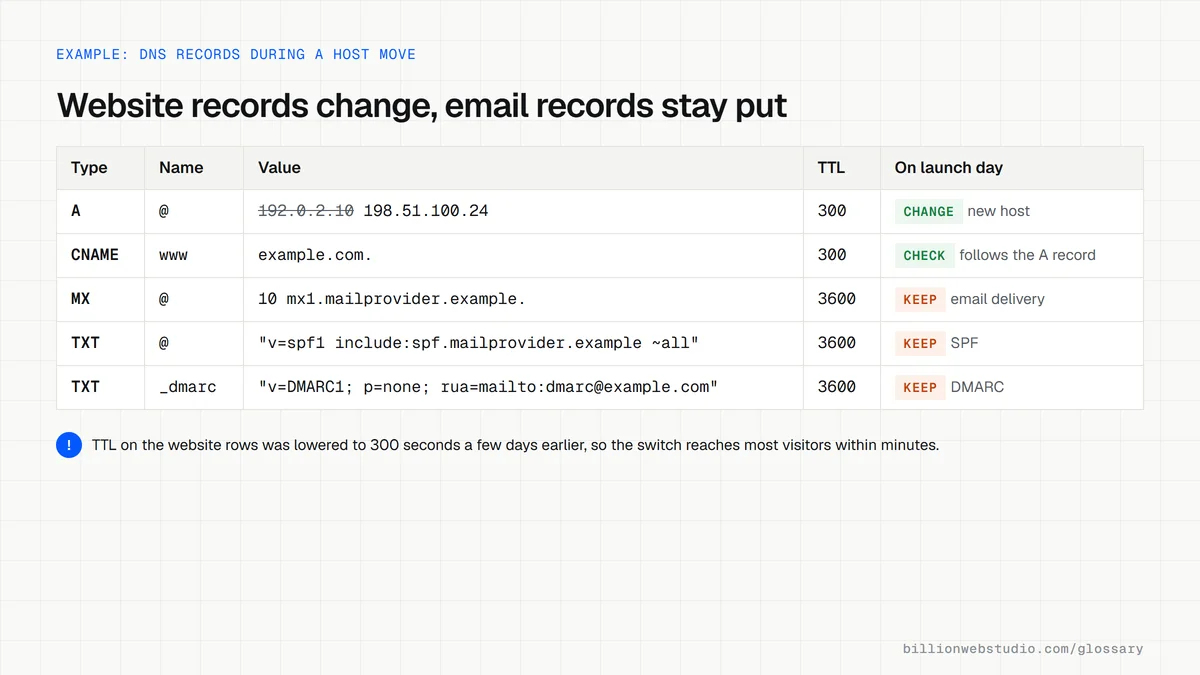
Common DNS record types
- An A record points a name to an IPv4 address, which is usually the server hosting your website.
- An AAAA record does the same job for an IPv6 address, as set out in RFC 3596.
- A CNAME record makes one name an alias of another, such as pointing www to the main domain or to a platform's address.
- An MX record names the mail servers that accept email for the domain, with a priority number for each.
- A TXT record holds text that other services read, including domain verification codes and email authentication policies such as SPF and DMARC.
- An NS record lists the name servers that are in charge of all the other records for the domain.
Why DNS records matter for a business website
A single wrong value can take your website offline or send customer emails into a void, and the fault is often invisible until someone complains. DNS records also prove you own the domain to services such as Google Search Console, and they decide whether your messages are trusted. Since February 2024, Google has required anyone sending to personal Gmail accounts to authenticate with SPF or DKIM, records that live in DNS.
A DNS record example
A dental clinic moves its website to a faster host but keeps its existing email provider. A week before the switch, the developer lowers the TTL on the website records, as Google's hosting move guidance suggests. On launch day only the A record and the www CNAME change. The MX and TXT records stay untouched, so appointment emails keep arriving throughout the move.
Common DNS record mistakes
- Deleting or overwriting MX records while pointing the domain at a new website host.
- Adding a second SPF record instead of merging both services into one.
- Changing name servers without first copying every existing record to the new provider.
- Keeping DNS in a login that belongs to a former developer or agency.
- Making changes with a long TTL in place, then panicking when the old answer lingers for hours.
Copy this sample DNS zone
; Sample DNS records for example.com (all values are placeholders)
; 192.0.2.10 is a documentation address: use the IP your host gives you
; Name               TTL   Class Type   Value
example.com.         3600  IN    A      192.0.2.10
www.example.com.     3600  IN    CNAME  example.com.
example.com.         3600  IN    MX     10 mx1.mailprovider.example.
example.com.         3600  IN    MX     20 mx2.mailprovider.example.
example.com.         3600  IN    TXT    "v=spf1 include:spf.mailprovider.example ~all"
_dmarc.example.com.  3600  IN    TXT    "v=DMARC1; p=none; rua=mailto:dmarc@example.com"
example.com.         3600  IN    TXT    "google-site-verification=PLACEHOLDER"
How to look up your domain's DNS records for free
- Open the Google Admin Toolbox Dig tool and type your domain, such as example.com, into the Name box.
- Click A to see the IP address your website points to, then try www.example.com, which often shows a CNAME instead.
- Click MX and write down every mail server with its priority number.
- Click TXT and count the records that start with v=spf1. There must be only one.
- Type _dmarc.example.com and click TXT to see whether a DMARC policy exists.
- Save all the results in a document before anyone changes hosts or name servers.
What good looks like: A and CNAME records point at your current host, MX records point at your email provider, there is exactly one SPF record, and a DMARC record starting v=DMARC1 is published.
Free tool: Google Admin Toolbox Dig
Questions to ask your web developer
“Before you change anything in DNS, will you export the full current zone and send it to us?”
A good answer: Yes. They save every existing record, mark which ones serve the website and which serve email, and change only the website records on launch day.
“Which account will hold our DNS, and will we have the login?”
A good answer: DNS sits in an account the business owns, the developer is added as a user, and two-factor sign-in is switched on.
“What TTL will you set before the move and after it?”
A good answer: They lower the TTL on the records that will change a day or more ahead, for example to 300 seconds, then raise it again once the new values are confirmed.
DNS record: common questions
How long do DNS record changes take to work?
It depends mainly on the TTL the old record had. Resolvers that cached the previous answer keep using it until that time runs out, which can be minutes or a day or more. Lowering the TTL a few days before a planned change makes the switch much quicker.
Where can I see my domain's DNS records?
Look in the dashboard of whichever company runs your name servers, which may be your registrar, your web host or a DNS service. Public lookup tools and the dig or nslookup commands also show the live records, which is useful for confirming that a change has taken effect.
What is the difference between an A record and a CNAME record?
An A record points a name straight to an IP address. A CNAME points a name to another name, which then resolves to an address. Platforms such as Shopify often ask for a CNAME on www so they can change their own server addresses without you editing anything.
Sources
- RFC 1035: Domain Names, Implementation and Specification
- RFC 3596: DNS Extensions to Support IP Version 6
- Google Workspace Admin Help: Email sender guidelines
- Google Search Central: Change hosting with no URL changes
- Google Admin Toolbox: Dig (DNS lookup)
- RFC 7208: Sender Policy Framework (one SPF record per domain)
- RFC 5737: IPv4 Address Blocks Reserved for Documentation
Want a website that gets this right?
Every Billion Web Studio build includes technical SEO, schema and speed work as standard, with a fixed quote within 1 business day.