Building and hosting
What Is Email Hosting?
Email hosting is a service that runs the mail servers for your own domain, so your team can send and receive messages at addresses like name@yourcompany.com, with storage, spam filtering and security handled by the provider.
What email hosting means in plain English
When someone emails your company, their mail server looks up your domain's MX records to learn where to deliver the message, a lookup set out in RFC 5321, the standard for sending email. Those records point to your email host, which stores each mailbox and lets staff read mail in a browser, a phone app or a desktop program.
Email hosting is a separate job from web hosting, even when one company sells both. Many web hosting plans include basic mailboxes on the same server. Dedicated services such as Google Workspace and Microsoft 365 run mail on their own infrastructure with shared calendars, larger storage and stronger spam filtering, billed per user.
Why email hosting matters for a business
A branded address looks more trustworthy on quotes and invoices than a free webmail account, and it stays with the company when staff leave. More importantly, the email host decides whether your messages land in the inbox. Google's sender guidelines, in force since February 2024, require everyone sending to personal Gmail accounts to set up SPF or DKIM authentication.
Anyone sending more than 5,000 messages a day to Gmail must also publish a DMARC policy and offer one-click unsubscribe on marketing mail. Website form notifications and quote confirmations depend on the same records, so a poorly configured email setup can quietly lose leads your website collected.
An email hosting example
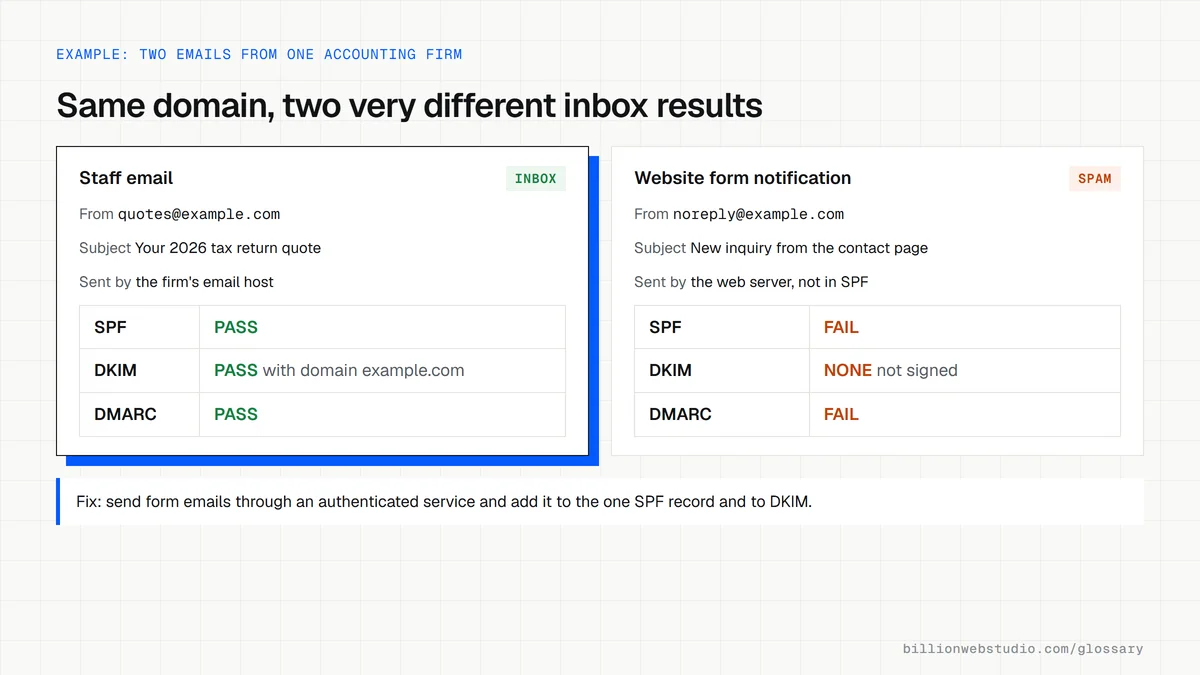
An accounting firm used the free mailboxes bundled with its shared web hosting. Client emails with attachments often went to spam, and storage ran out every tax season. The firm moved to a dedicated email host, set up SPF, DKIM and DMARC records, and later changed web hosts without touching email, because the MX records now pointed to a separate service.
Common email hosting mistakes
- Keeping mailboxes on the same cheap server as the website, so one outage takes down both.
- Sending website form emails from the web server without authentication, so they land in spam.
- Registering the email account under one employee's personal login instead of a company admin account.
- Overwriting MX records during a website launch and losing incoming mail for days.
- Assuming the provider keeps full backups when the plan only retains deleted mail for a short time.
Copy these email DNS records (Google Workspace example)
; Email records for example.com on Google Workspace
; Type  Host                Value
MX      @                   1 smtp.google.com.
TXT     @                   "v=spf1 include:_spf.google.com ~all"
TXT     google._domainkey   "v=DKIM1; k=rsa; p=PASTE_PUBLIC_KEY_FROM_ADMIN_CONSOLE"
TXT     _dmarc              "v=DMARC1; p=none; rua=mailto:dmarc-reports@example.com"

; DKIM key: Admin console > Apps > Google Workspace > Gmail > Authenticate email
; Keep ONE SPF record: add other senders as extra include: entries in it
; Move DMARC from p=none to p=quarantine once reports show your mail passes
How to check your business email passes SPF, DKIM and DMARC
- Send an email from your business address to a personal Gmail account.
- Open it in Gmail on a computer, click the More icon (three dots) next to Reply and choose Show original.
- Read the summary at the top of the new window: SPF, DKIM and DMARC should each say PASS.
- Repeat with a message sent through your website's contact form, because form notifications often use a different sending server.
- If anything fails, run your domain through the Google Admin Toolbox Check MX tool to see which record is missing or wrong.
What good looks like: All three show PASS for both staff email and website notifications, and DKIM is signed with your own domain rather than only your provider's default domain.
Free tool: Google Admin Toolbox Check MX
Questions to ask your web developer
“Who will own the email admin account, and is it separate from any one employee's mailbox?”
A good answer: A dedicated admin login owned by the business, protected with two-factor sign-in, plus a second admin as a backup.
“How will website form emails be sent so they do not land in spam?”
A good answer: Through an authenticated sending service or your email host's SMTP, from an address on your domain, with SPF and DKIM covering that service.
“What will happen to our email during the website launch?”
A good answer: Nothing. MX, SPF, DKIM and DMARC records are copied first and left untouched, and only the website records change.
Email hosting: common questions
Is email hosting the same as web hosting?
No. Web hosting stores and serves your website files, while email hosting stores mailboxes and handles sending and receiving mail. They are controlled by different DNS records, so you can use one provider for each. Keeping them separate means a website problem or a change of web host does not interrupt your email.
Do I need email hosting if I already use Gmail?
A free Gmail account gives you an address ending in gmail.com. To send from your own domain with proper authentication, you need email hosting for that domain, such as Google Workspace, which uses the familiar Gmail interface but with your company's address and admin controls.
Can I keep my email when I change website hosts?
Yes, as long as your email is hosted separately and the MX and email-related TXT records are kept as they are. Before any switch, copy every DNS record and confirm which ones belong to your mail service. Only the records that point to the website should change.
Sources
Want a website that gets this right?
Every Billion Web Studio build includes technical SEO, schema and speed work as standard, with a fixed quote within 1 business day.