Conversion and analytics
What Is Click to Call?
Click to call is a link or button that starts a phone call when tapped, so a visitor on a smartphone can ring a business straight from its website, ad or search listing without copying or dialing the number by hand.
What click to call means in plain English
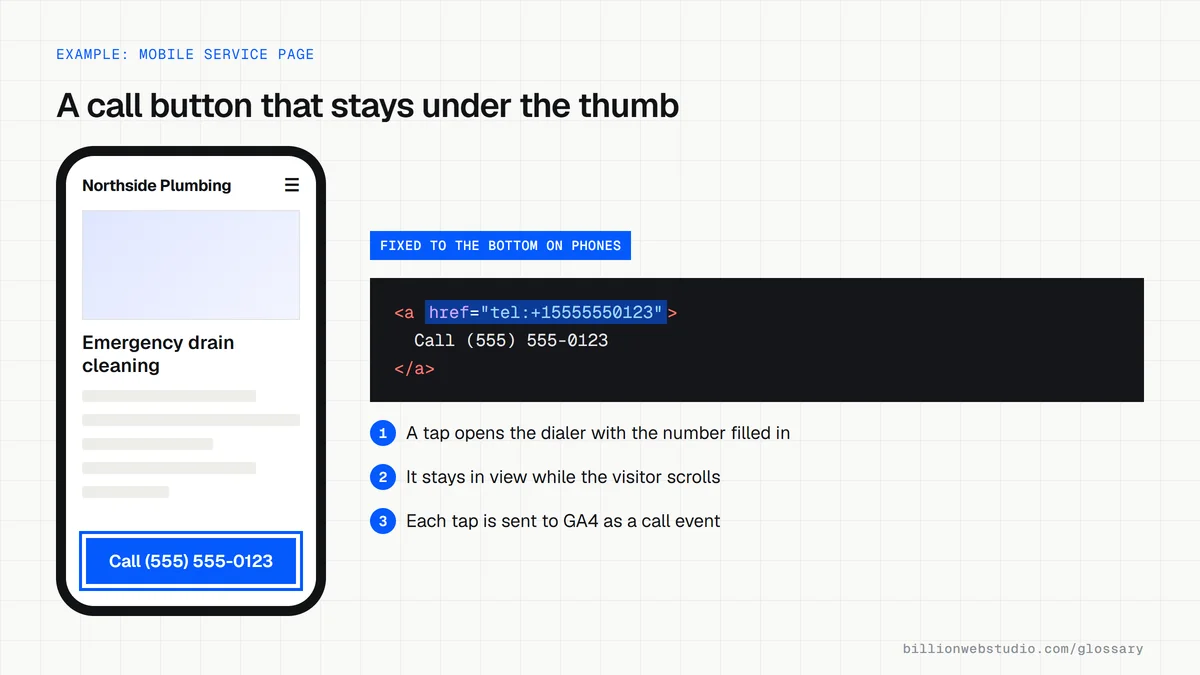
On a website, click to call is an ordinary link that uses the tel: scheme instead of an https address, for example <a href="tel:+15555550123">(555) 555-0123</a>. Tapping it on a phone opens the dialer with the number filled in. On a computer, the browser may hand the number to a calling app such as FaceTime or Skype, or offer to send it to a phone. RFC 3966 defines the tel: format.
The same idea appears beyond your own site. Google Ads call assets add a phone number and a call button to search ads, and Business Profile listings on Google Search and Maps include a call button too. Each one connects the customer to you without a single page visit.
Why click to call matters for a business website
Someone with a burst pipe or a toothache wants to talk to a person, not fill in a form. If the number on your mobile site is plain text, they must memorize or copy it, and some will give up and ring the next business instead. A visible call button in the header turns urgent visits into calls, and each tap can be recorded in analytics as a lead signal.
A click to call example
An electrician's mobile homepage shows the phone number as plain text in the footer. The redesign adds a call button to the sticky header and beside each service description, all using the same tel: link. In GA4, a tap on any of them is recorded as an event and marked as a key event. The owner can now see which pages produce taps and compare them with the calls the team actually logs.
Common click to call mistakes
- Writing the tel: link without the plus sign and country code, which can fail for callers in other countries.
- Making call buttons so small or crowded that thumbs hit the wrong one, when WCAG 2.2 sets a 24 by 24 CSS pixel minimum for pointer targets at Level AA.
- Showing the number only inside an image, so it cannot be tapped and screen readers cannot read it.
- Burying the call button in a mobile menu instead of keeping it in view.
- Linking to a line that goes unanswered after hours with no voicemail or callback option.
Copy this mobile call button
<!-- Sticky call button for phones. Keep the + and country code in href -->
<a href="tel:+15555550123" class="call-button">Call (555) 555-0123</a>

<style>
  .call-button { display: none; }

  @media (max-width: 768px) {
    .call-button {
      display: block;
      position: fixed;
      left: 16px;
      right: 16px;
      bottom: 16px;
      min-height: 48px;
      padding: 12px 16px;
      background: #0b5cff;
      color: #fff;
      font-weight: 600;
      text-align: center;
    }
    /* Leave room so the button never hides the footer */
    body { padding-bottom: 88px; }
  }
</style>
How to test the call buttons on your own site
- On your phone, open your homepage, every service page and the contact page, and tap each phone number and call button. The dialer should open with the full number filled in.
- On a computer, open the page in Chrome, right-click the call button and choose Inspect. The href should start with tel:+ followed by your country code and number.
- In DevTools, click the Toggle device toolbar button (the phone and tablet icon) to see a phone-size view, and check the button stays visible without covering the menu or a form.
- Tap the button once on your phone, then open GA4 and go to Reports, then Realtime overview. If no call event appears, the taps are not being tracked.
- Call the number yourself during a busy hour and after closing time to hear what a customer hears.
What good looks like: Every visible number is a working tel: link with the country code, the main call button stays in reach on a phone screen, and each tap shows up in analytics as an event.
Free tool: Chrome DevTools device mode
Questions to ask your web developer
“Will every phone number on the site be a tel: link, including the header, footer and service pages?”
A good answer: Yes. The number is stored once in the site settings and every template outputs it as a tel: link with the country code, so changing the number in one place updates every button.
“How will we know how many calls the website produces?”
A good answer: Taps on call links are sent to GA4 as an event and marked as a key event. If you need to know which taps became real conversations, they explain call tracking with forwarding numbers and what it costs.
“What will desktop visitors see where tapping to call is not possible?”
A good answer: The full number as readable, selectable text beside a form or booking option, rather than a button that does nothing useful when clicked on a computer.
Click to call: common questions
How do I make a phone number clickable on my website?
Wrap the number in a link that uses the tel: scheme, such as <a href="tel:+15555550123">(555) 555-0123</a>. Include the plus sign and country code inside the link, and display the number in a format your customers recognize. Most website builders and CMS platforms offer a phone link option that writes this code for you.
Does click to call work on desktop computers?
Sometimes. A desktop browser passes the tel: link to whatever calling app is installed, such as FaceTime, Skype or a softphone, and may offer to send the number to a paired phone. Without such an app nothing useful happens, so show the full number as visible text beside any call button.
Can you track click to call taps?
Yes. Taps on a tel: link can be recorded in GA4 as an event, often set up through Google Tag Manager, and marked as a key event. Google Ads can also count clicks on a number on your mobile site. Neither records whether the call connected, which needs separate call tracking.
Sources
- MDN: The anchor element, linking to telephone numbers
- IETF RFC 3966: The tel URI for Telephone Numbers
- Google Ads Help: About call assets
- Google Ads Help: About phone call conversion tracking
- W3C: Understanding WCAG 2.2 Success Criterion 2.5.8 Target Size (Minimum)
- Chrome for Developers: Simulate mobile devices with device mode
Want a website that gets this right?
Every Billion Web Studio build includes technical SEO, schema and speed work as standard, with a fixed quote within 1 business day.