Conversion and analytics
What Is First-Party Data?
First-party data is information a business collects directly from its own customers and website visitors, such as form submissions, purchase history, email sign-ups and on-site behavior, with no other company in between.
What first-party data means in plain English
The name describes who collected the data. First-party data comes from your own channels: your website, store, CRM, booking tool or newsletter. Second-party data is another company's first-party data shared with you through a partnership. Third-party data is gathered by companies with no direct relationship to the people in it, then sold or rented to advertisers.
For a typical business website, first-party data includes contact details from quote forms, the pages a lead read before calling, orders and repeat purchases, and answers people give in surveys or account settings. Information that customers hand over on purpose, such as their preferences, is sometimes called zero-party data.
Why first-party data matters for a business website
Browsers have limited cross-site tracking for years. Safari has blocked third-party cookies by default since March 2020, and in April 2025 Google said Chrome would keep its existing approach of letting users choose. Data you collect yourself stays usable whatever those settings are, and Google Ads features such as Customer Match and enhanced conversions are built to use it.
A first-party data example
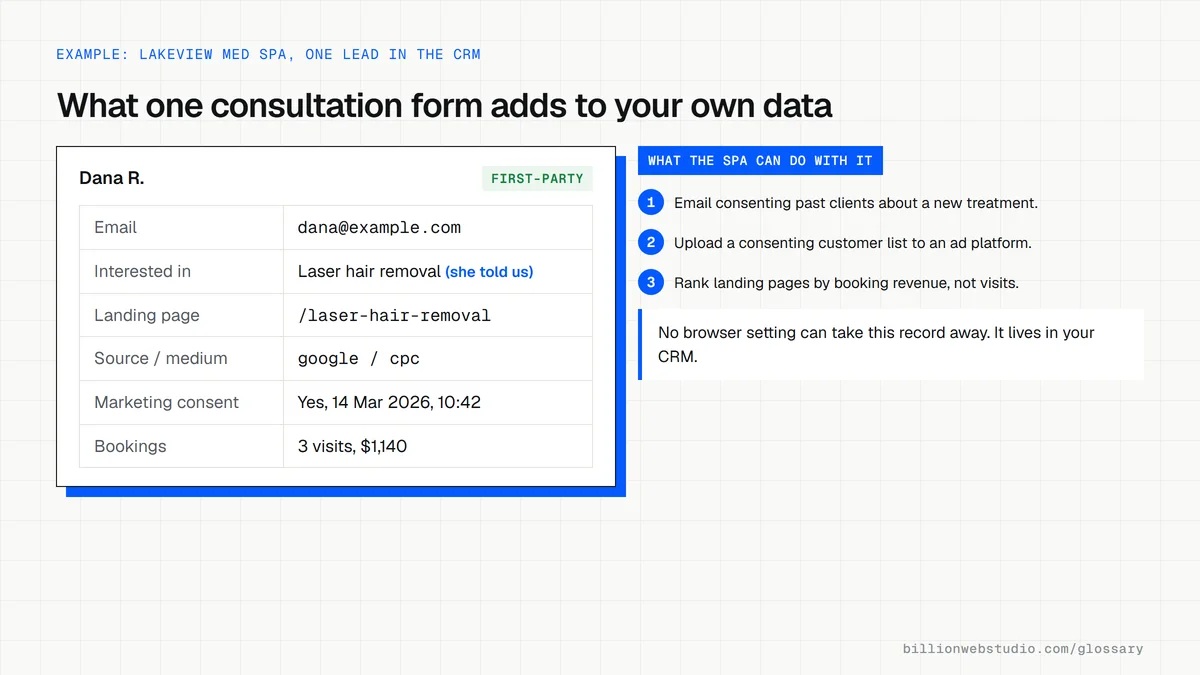
A med spa adds a short consultation form that asks which treatment the visitor wants, and stores each answer in its CRM along with the page the lead came from. Six months later it can email past clients about a new service, upload a consenting customer list to Google Ads for Customer Match, and see which pages produce the highest-value bookings.
Common first-party data mistakes
- Collecting contact details without a clear privacy notice or the consent your region requires.
- Leaving leads scattered across inboxes and spreadsheets instead of one CRM where they can be used.
- Asking for more form fields than you will ever use, which lowers completions.
- Losing the source of each lead, so you cannot tell which pages and channels produce customers.
- Uploading customer lists to ad platforms when your privacy notice never told customers you would.
Copy this form that keeps each lead's source
<form action="/quote" method="post">
  <label>Name <input type="text" name="name" autocomplete="name" required></label>
  <label>Email <input type="email" name="email" autocomplete="email" required></label>
  <input type="hidden" name="utm_source">
  <input type="hidden" name="utm_medium">
  <input type="hidden" name="utm_campaign">
  <input type="hidden" name="landing_page">
  <label><input type="checkbox" name="marketing_consent" value="yes"> Email me offers and news</label>
  <button type="submit">Request a quote</button>
</form>
<script>
  // Put this before </body> on every page so the first landing page is kept
  var params = new URLSearchParams(window.location.search);
  ["utm_source", "utm_medium", "utm_campaign"].forEach(function (key) {
    if (params.get(key)) sessionStorage.setItem(key, params.get(key));
  });
  if (!sessionStorage.getItem("landing_page")) {
    sessionStorage.setItem("landing_page", window.location.pathname);
  }
  document.querySelectorAll("form input[type=hidden]").forEach(function (input) {
    input.value = sessionStorage.getItem(input.name) || "";
  });
</script>
How to check the first-party data your website collects
- Submit your own contact or quote form from a phone, using a page address with ?utm_source=test&utm_medium=check added to the end.
- Open the lead in your CRM or inbox and list every field that arrived: contact details, answers, page, source and consent.
- Check that the landing page and the test source came through. If they did not, the origin of every real lead is being lost too.
- Open your privacy notice and confirm it names each planned use, such as email marketing or uploading customer lists to ad platforms.
- Find every other copy of lead data, such as spreadsheets, old form plugins or shared inboxes, and move it into one system.
What good looks like: Each lead record shows how the person found you, what they asked for, and whether and when they agreed to marketing, all stored in one system your business controls and can export.
Questions to ask your web developer
“Where does each form submission end up, and can we export it?”
A good answer: In one CRM or database the business owns, with a documented export, not only in an inbox or a form plugin that deletes old entries.
“Does every lead record keep its source and first landing page?”
A good answer: Yes. Hidden fields or the CRM's own tracking store source, medium, campaign and landing page, and they show a test lead that proves it.
“How is marketing consent captured and stored?”
A good answer: An unticked checkbox with plain wording, saved with the date and time, plus a way to record when someone withdraws consent.
First-party data: common questions
What is the difference between first-party and third-party data?
First-party data is collected by your business from people who deal with you directly, so you know where it came from and how consent was given. Third-party data is collected by outside companies, often across many websites, and sold to advertisers, so you have far less visibility into how it was gathered.
Are first-party cookies the same as first-party data?
Not quite. A first-party cookie is a small file set by the website a person is visiting, often used to remember a login or measure visits. First-party data is the wider set of information a business holds about its own audience, which can come from cookies, forms, purchases, calls or in-person sales.
Sources
Want a website that gets this right?
Every Billion Web Studio build includes technical SEO, schema and speed work as standard, with a fixed quote within 1 business day.