Conversion and analytics
What Is Dynamic Number Insertion (DNI)?
Dynamic number insertion (DNI) stands for Dynamic Number Insertion.
Dynamic number insertion (DNI) is a call tracking method in which a script on a website swaps the displayed phone number for a tracking number tied to the visitor's traffic source, so each call can be traced to the ad, search or campaign behind it.
What dynamic number insertion means in plain English
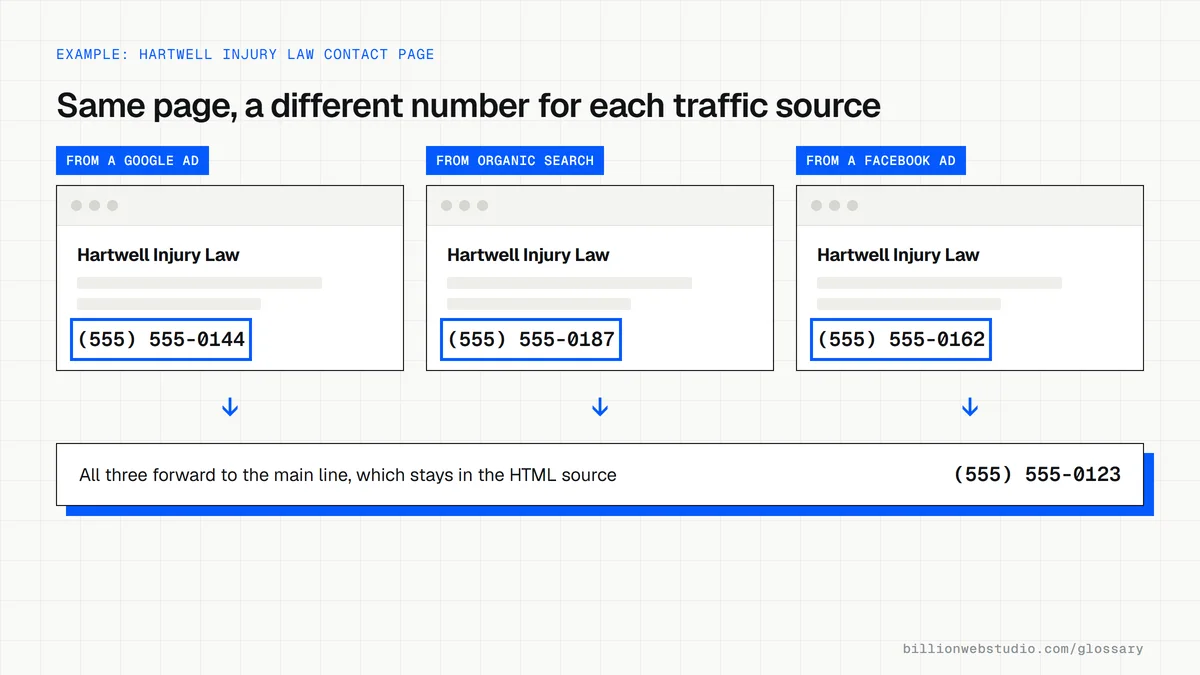
Your website code contains your normal business number. When a page loads, a small script from a call tracking provider checks where the visitor came from, such as a Google ad, organic search, Facebook or an email, and replaces the number on screen with one reserved for that source. Calls to the tracking number forward to your real line, so the caller notices nothing.
There are two common levels. Source-level DNI gives each channel its own number, which needs only a handful of lines. Session-level DNI gives each visitor a number from a pool for the length of the visit, so a call can be matched to the exact keyword, landing page and pages viewed. That detail needs a larger pool of numbers and costs more to run.
Why dynamic number insertion matters for a business website
For businesses where the best leads phone rather than fill in a form, such as plumbers, law firms and clinics, analytics without call data undercounts results. An ad campaign can look like a failure in reports while it quietly fills the schedule. DNI closes that gap and lets ad platforms learn which clicks produce calls. Google Ads offers its own version: a website call conversion tag that swaps your number for a Google forwarding number after someone clicks one of your Search ads.
A dynamic number insertion example
A personal injury firm installs a DNI script with session-level numbers. A visitor clicks its ad for truck accident lawyer, reads two pages and calls the number in the header. The tracking system records the call, the keyword, the landing page and the six minute duration, then sends a conversion to Google Ads. After a month the firm sees which keywords produce long calls and moves budget toward them.
Common dynamic number insertion mistakes
- Hard-coding a tracking number into the page HTML, so search engines and directories record a number that is not your main one.
- Swapping the visible number but not the tel: link behind the call button, so taps still reach an untracked line.
- Running too few numbers in a session pool, so two visitors share a number and calls are credited to the wrong source.
- Leaving numbers inside images or PDFs unchanged, so some calls never reach the tracking system.
- Recording calls without checking the consent rules that apply where you and your callers are.
Copy this Google Ads number swap setup
<!-- 1. The Google tag (gtag.js) from your Google Ads account must already load on this page -->

<!-- 2. Keep your real number in the HTML so search engines and directories read it -->
<a href="tel:+15555550123">+1 555-555-0123</a>

<!-- 3. Website call conversion: shows a Google forwarding number instead of
     the number above to visitors who arrived by clicking one of your ads.
     Replace TAG_ID/CONVERSION_LABEL with the values from Google Ads.
     The number must match the page exactly, including the country code.
     The default tag tracks one number per page. -->
<script>
  gtag('config', 'TAG_ID/CONVERSION_LABEL', {
    'phone_conversion_number': '+1 555-555-0123'
  });
</script>
How to check dynamic number insertion is working
- Open your homepage in a private browser window by typing the address directly, and note the phone number on screen.
- Right-click, choose View page source and press Ctrl+F (Cmd+F on a Mac) to search for your main number. It should be in the HTML even when the screen shows a different one.
- In a new private window, open the page through a test link your call tracking provider supports, such as one tagged with utm_source=facebook, and confirm the number on screen changes.
- Right-click the call button, choose Inspect and check the tel: link changed to the same tracking number, not only the visible text.
- Call the tracking number and confirm it rings your line and the call appears in the provider's call log under the right source.
What good looks like: Your main number sits in the page source, the visible number and the tel: link change together for tracked visitors, and every test call shows up in the call log with the correct source.
Free tool: Google Ads Help: website call conversions
Questions to ask your web developer
“Which numbers on the site will the script change, and which stay fixed?”
A good answer: Every visible number and tel: link in the header, body and footer changes for tracked visitors, while the number in the HTML source, your schema markup and your Business Profile stays the main number.
“How many numbers are in the pool, and how did you size it?”
A good answer: They base the pool on the peak number of visitors on the site at the same time from the tracked sources, and check the provider's report for moments when the pool ran out.
“Where will the call data end up?”
A good answer: Calls are sent to GA4 or Google Ads as conversions with the source and keyword attached, with a minimum call length set so wrong numbers and hang-ups do not count as leads.
Dynamic number insertion (DNI): common questions
Does dynamic number insertion hurt local SEO?
Not when it is set up correctly. Keep your main number in the page's HTML so search engines and directories read a consistent number, and let the script change it only in the visitor's browser. Your Google Business Profile, citations and schema markup should all show the same main number.
What is the difference between DNI and call tracking?
Call tracking is the broad practice of using unique phone numbers to measure where calls come from, including numbers printed on flyers, vans and billboards. Dynamic number insertion is the website part of it: software that changes the number shown on your pages depending on how each visitor arrived.
How many tracking numbers do I need for DNI?
For source-level tracking, you need one number per channel you want to separate, such as paid search, organic search and social. For session-level tracking, the pool must cover the number of visitors on the site at the same moment, so busier sites need larger pools. Providers usually size the pool from your traffic data.
Sources
Want a website that gets this right?
Every Billion Web Studio build includes technical SEO, schema and speed work as standard, with a fixed quote within 1 business day.