Conversion and analytics
What Is a Heatmap?
A heatmap is a visual report that overlays colors on a web page to show where visitors click, how far they scroll and where they spend time, with warm colors for high activity and cool colors for low activity.
What a website heatmap means
Analytics tells you how many people visited a page and whether they converted. A heatmap shows what they did on the page itself. Tools collect clicks and scroll positions from many sessions and combine them into one picture, so patterns stand out that no single visit would reveal. Microsoft Clarity, for example, offers heatmaps at no cost.
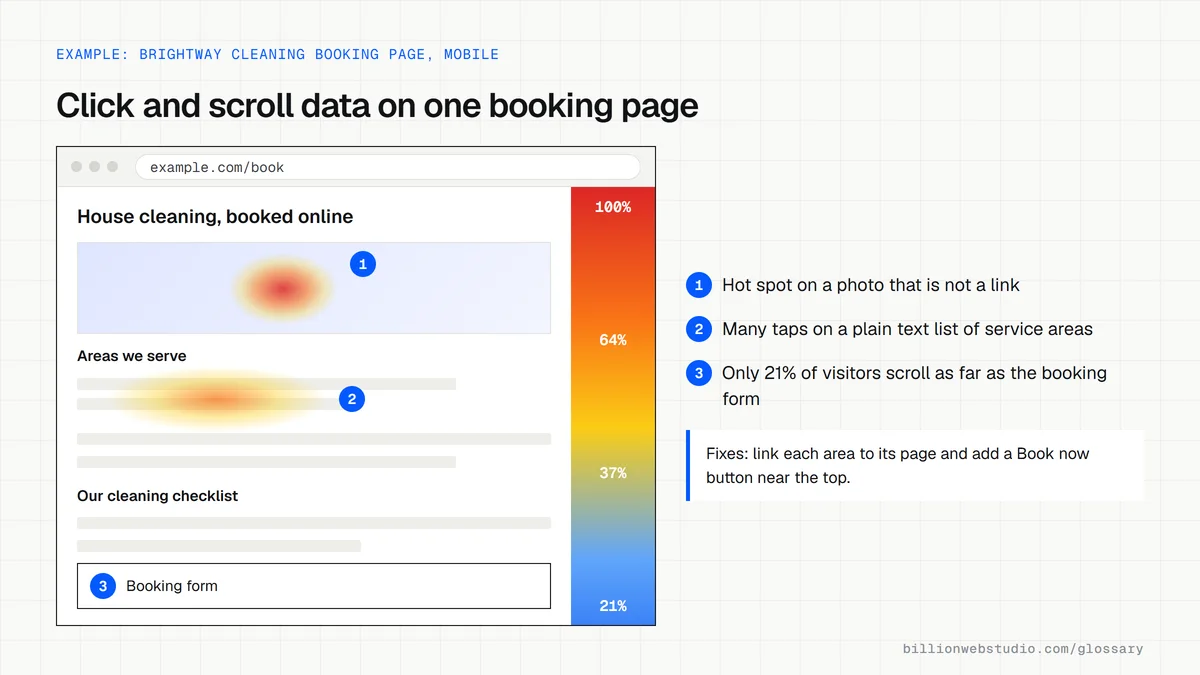
Types of heatmaps
- Click maps show which elements people click or tap most, including things that are not links.
- Scroll maps show what share of visitors reach each part of the page, and where the average fold sits.
- Attention maps show how long visitors spend on each section of the page.
- Area maps add up the clicks on every element inside a region you select.
- Rage click and dead click views highlight repeated frustrated clicks and clicks that do nothing.
Why heatmaps matter for a business website
Heatmaps explain why a page underperforms. A scroll map may show that most mobile visitors never reach your pricing or quote form. A click map may show people tapping a photo or heading they expect to be a link. Those findings point to specific, cheap fixes, and they give you evidence before you spend money on a redesign.
A heatmap example
A cleaning company's booking page has steady traffic but few bookings. Its click map shows many taps on a plain text list of service areas, and its scroll map shows that most mobile visitors stop well before the booking form. The team turns each area into a link to its own page and adds a Book now button near the top.
Common heatmap mistakes
- Drawing conclusions from a handful of sessions, which shows noise rather than patterns.
- Mixing desktop and mobile data, even though layouts and behavior differ.
- Adding a heatmap or recording tool without updating the privacy policy and cookie consent setup.
How to read each heatmap and what to fix
| Heatmap view | What to look for | Usual fix |
|---|---|---|
| Click map | Taps on photos, headings or icons that are not links | Make the element a link, or restyle it so it no longer looks clickable |
| Dead and rage clicks | Clicks that do nothing, or bursts of repeated clicks on one spot | Repair the broken element or explain why nothing happens |
| Scroll map | The point where most visitors stop, compared with where your form or price sits | Move the call to action or key fact above that point |
| Average fold | What fits on screen before any scrolling, for each device | Fit the headline, offer and main button inside it on mobile |
| Attention map | Sections with long viewing time but no clicks nearby | Add a call to action beside the section people actually read |
| Area map | Total clicks on a whole region, such as the menu or a pricing table | Remove or merge menu items that almost nobody uses |
How to read a heatmap of your key page in Microsoft Clarity
- Install the free Clarity tracking code and let it collect visits, then sign in at clarity.microsoft.com and open your project.
- Click Heatmaps and type the address of your most important page, such as the quote or booking page, into the Visited URL bar.
- Choose Mobile in the device switch at the top, since phone layouts and behavior differ from desktop.
- Switch to the scroll map, hover over your form or main button and read the percentage of visitors who reached it.
- Switch to the click map and open the Dead clicks and Rage clicks views to find elements people tap that do nothing.
What good looks like: Most mobile visitors reach your main call to action, the most-tapped elements are real links or buttons, and dead or rage clicks are rare and have a known cause.
Free tool: Microsoft Clarity scroll maps
Questions to ask your web developer
“Will you look at heatmaps before proposing changes to our key pages?”
A good answer: Yes. They review click and scroll maps split by mobile and desktop for the main pages and show what they found next to each proposed change.
“How will the heatmap tool fit our cookie consent and privacy policy?”
A good answer: They list the tool in the privacy policy, load it under the consent rules that apply to your visitors, and keep masking switched on so typed form details are not captured.
“How do you avoid reading too much into a heatmap?”
A good answer: They check how many page views each map is based on, compare equal date ranges before and after a change, and confirm a pattern in recordings or analytics before acting on it.
Heatmap: common questions
Are heatmap tools free?
Some are. Microsoft states that Clarity is free with no traffic limits and no paid upgrade, and it includes click, scroll, area and attention maps. Paid tools add features such as on-page surveys and funnel reports, which larger teams may want.
Do heatmaps slow down a website?
Heatmap tools load a tracking script, which adds some extra work for the browser. The effect is usually small when the script loads asynchronously, but test page speed before and after installing one, and remove any tracking tools you no longer use.
Sources
Want a website that gets this right?
Every Billion Web Studio build includes technical SEO, schema and speed work as standard, with a fixed quote within 1 business day.