Conversion and analytics
What Are Key Events in GA4?
Key events are the events in Google Analytics 4 (GA4) that a business marks as especially important to its success, such as a purchase, quote request or phone tap. Google renamed GA4 conversions to key events in March 2024.
What key events mean in plain English
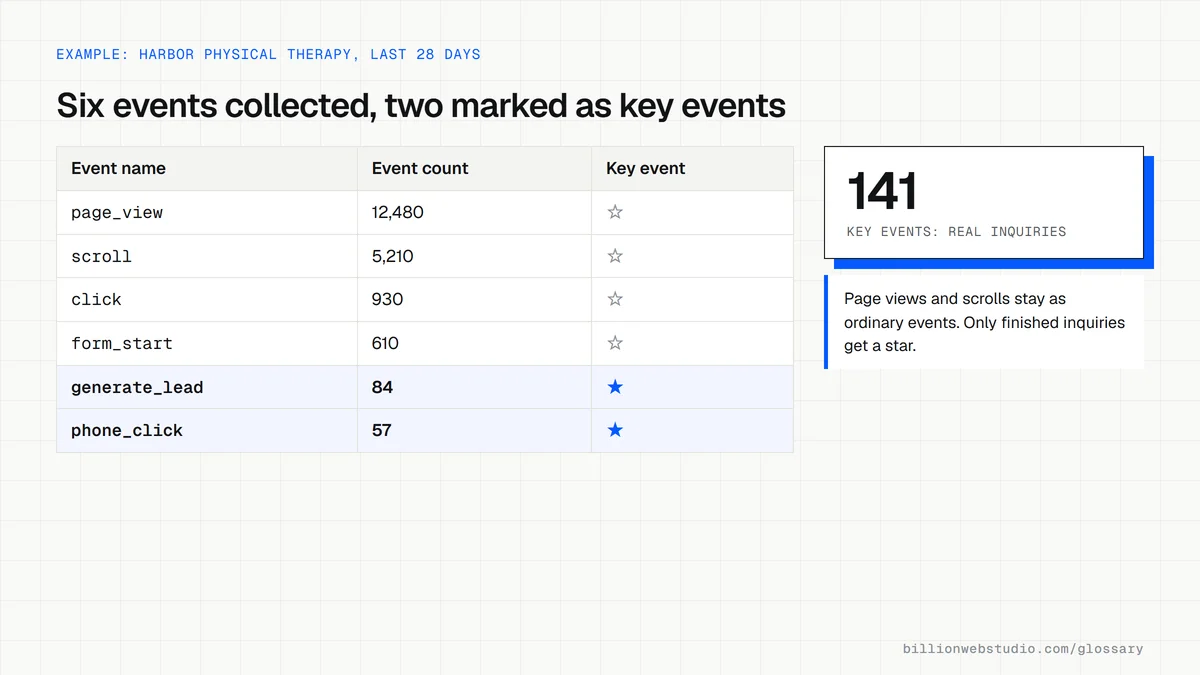
GA4 records everything as an event: a page view, a scroll, a button click, a form submission. Most events are background detail. A key event is one you flag because it represents a result the business cares about. Any event GA4 collects can be marked as a key event in Admin, and reports then count how many happened and which channels and pages led to them.
Before March 2024, GA4 called these conversions. Google changed the name because Google Ads also used the word conversion, and the two products counted differently. Key events are now for analysis inside Analytics, while conversions are the ones you share with Google Ads for campaign measurement and bidding. Google states that key event metrics are not directly eligible for bidding.
Why key events matter for a business website
Key events turn traffic reports into lead reports. Without them, GA4 can say how many people visited but not how many asked for a quote, booked or bought. With them, an owner can compare channels by results, spot pages that attract visits but no inquiries, and judge whether a redesign helped. Billion Web Studio sets up lead tracking in analytics on every build, so this data starts on launch day.
A key events example
A physical therapy clinic marks three events as key events in GA4: a submitted booking form, a tap on its phone number and a click on its online booking link. It leaves page views and scrolls as ordinary events. After a quarter, the Traffic acquisition report sorted by session key event rate shows organic visitors book at twice the rate of social visitors, so the clinic invests in its service pages.
How to check key events on your own site
- In GA4 Admin, open Key events and confirm only real business outcomes are marked, not page views or scrolls.
- Submit a test form and tap the phone link, then look for both in the Realtime report.
- Check that reloading a thank you page or double clicking a button does not count one lead twice.
- Give each key event a value if leads differ in worth, so reports reflect revenue as well as volume.
- If you run Google Ads, confirm which key events are also set up as conversions for bidding.
Copy this lead event for GA4
// Send this only after your server has accepted the form,
// not when the button is clicked, so failed sends are not counted.
gtag('event', 'generate_lead', {
  currency: 'USD',     // required whenever value is set
  value: 150,          // what a typical lead is worth to you
  lead_source: 'Quote form'
});

// Then in GA4: Admin > Data display > Events,
// and click the star next to generate_lead to make it a key event.
How to mark an event as a key event in GA4
- In GA4, click Admin (the gear icon at the bottom left), then open Events under Data display.
- In the Recent events tab, find the event for the action you care about, such as generate_lead. An event only appears here after GA4 has collected it.
- Click the star next to it. A filled star means it is now a key event.
- If the event does not exist yet, click Create event, name it, turn on Mark as key event, choose a default key event value and counting method, then click Create.
- Review the starred list. A standard property allows up to 30 key events, so keep it to real business outcomes.
What good looks like: A short list of starred events, each one a real result such as a lead, booking or purchase, counted the way you intend and carrying a value where leads differ in worth.
Free tool: Analytics Help: Mark events as key events
Questions to ask your web developer
“Which events will you mark as key events, and why each one?”
A good answer: A short list tied to revenue, such as generate_lead, a booking confirmation and a phone tap, each with a written trigger rule, and no page views, scrolls or clicks that do not complete anything.
“Should our key events count once per event or once per session?”
A good answer: Once per event for purchases, where each order is separate revenue; once per session for leads if visitors often submit twice, so a single inquiry is not counted as two.
“Will Google Ads optimize toward the same key events?”
A good answer: Only the key events that stand for real leads or sales are used as Google Ads conversions, and they say which ones are primary for bidding and why.
Key events (GA4): common questions
What is the difference between key events and conversions?
In GA4, key events are the important actions you mark for reporting and analysis. Conversions are key events that you also share with Google Ads, where they measure campaigns and guide automated bidding. Every conversion starts as an event in Analytics, but not every key event needs to become a Google Ads conversion.
Did GA4 delete my old conversion data?
No. Existing conversions were renamed key events automatically, and their history stays available under the new name, so year over year comparisons still work. Related metrics changed labels too, so older guides that mention conversion counts in GA4 now map to key event counts in the current interface.
Are key events the same as goals in Universal Analytics?
They do a similar job. Universal Analytics used goals, such as reaching a destination page or staying past a time threshold. GA4 has no goals; instead you mark events as key events. The practical difference is that a key event must first exist as an event, so actions like form submissions may need tagging first.
Sources
- Analytics Help: Conversions vs. key events in Google Analytics
- Analytics Help: Video transcript, conversions and key events
- Analytics Help: Create or modify key events
- Analytics Help: Mark events as key events
- Google for Developers: GA4 recommended events, generate_lead
- Analytics Help: Change the counting method of key events
Want a website that gets this right?
Every Billion Web Studio build includes technical SEO, schema and speed work as standard, with a fixed quote within 1 business day.