SEO
What Is Programmatic SEO?
Programmatic SEO is the practice of creating many web pages automatically from one template and a structured dataset, with each page targeting a specific search, such as one page per city, product model or comparison.
What programmatic SEO means in plain English
Instead of writing each page by hand, a team designs one page template and fills it from a database. The database might hold locations, product specifications, prices, reviews or comparison data. Each row becomes a page with its own URL, title and content, aimed at a specific long-tail search such as one product compared with another.
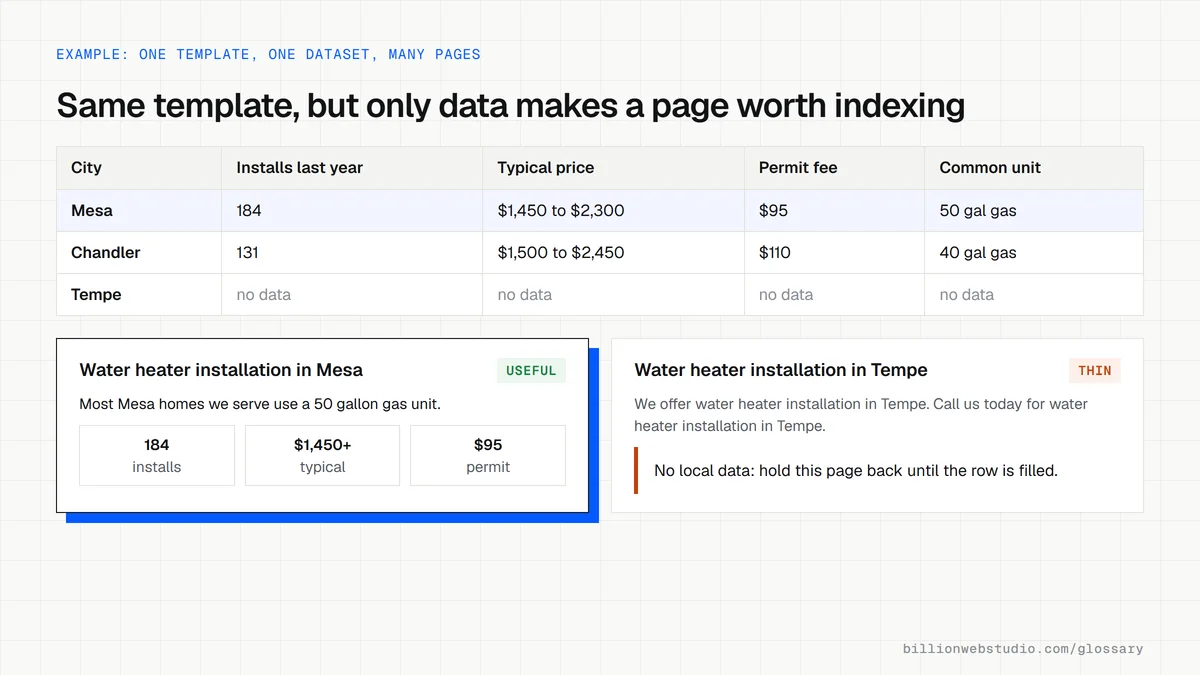
Travel, real estate, job and software sites use this approach because their visitors search for thousands of specific combinations that no team could write by hand. The method itself is neutral. Whether it works depends entirely on whether each page holds information worth finding.
Why programmatic SEO matters for a business website
Done well, programmatic SEO lets a business answer thousands of specific questions with real data, often for searches with little competition. Done badly, it is exactly what Google's spam policies target. Google introduced its scaled content abuse policy on March 5, 2024, covering many pages generated mainly to manipulate rankings, whether by AI, people or both.
City pages that exist only to funnel visitors to one main page fall under a separate policy, doorway abuse. Either can cost a site its rankings, so the value of each page has to be planned before a single page is generated.
An example of programmatic SEO
A used truck marketplace holds data on hundreds of models: payload, engine, fuel economy, price ranges and owner reviews. It builds one page per model and one per pair of commonly compared models, each drawn from that data with its own specification table and summary. Every page shows details a buyer would otherwise need several sites to gather, which is what makes it worth indexing.
How to check a programmatic SEO page
- Compare two pages side by side and confirm the differences go beyond a swapped city or product name.
- Check that each page holds data or detail a visitor could not get from any of its sibling pages.
- Hold back pages with no real data behind them instead of publishing them with empty sections.
- Link the pages into a browsable structure, such as category hubs, so they are not orphan pages found only through a sitemap.
- Watch the Page indexing report in Search Console, where large numbers of crawled but unindexed pages can mean Google sees little value.
When a template page is worth publishing
| Check | Worth publishing | Hold back or merge |
|---|---|---|
| Data behind the page | Several fields unique to this row, such as prices, specifications or local job counts | Only the name or city changes |
| Text | Sentences built from the data, so they differ page to page | The same paragraphs with one word swapped |
| Search demand | People search for this combination | Combinations nobody searches, made because the data allowed it |
| Empty fields | Page waits until the data is filled | Sections that say no data yet |
| Links | Reached from a hub or category page | Listed only in the sitemap |
How to check whether Google values your template pages
- List all template pages in their own XML sitemap, such as sitemap-models.xml, and submit it in Search Console under Indexing, then Sitemaps.
- Open Indexing, then Pages, and change the dropdown above the chart from All known pages to that sitemap.
- Compare the indexed count with the not indexed count, then open the Crawled - currently not indexed and Discovered - currently not indexed rows to see example URLs.
- Open three indexed and three unindexed examples side by side and note what the indexed ones have that the others lack, such as more data, reviews or photos.
- In Performance, click + Add filter, choose Page, enter the folder the template uses, such as /models/, and check clicks and impressions for the group as a whole.
What good looks like: Most URLs in the template sitemap are indexed and earn impressions. When a large share sits in crawled but not indexed, enrich or remove those pages before generating more.
Free tool: Page indexing report help
Questions to ask your web developer
“What data fills each page, and how many rows have complete data today?”
A good answer: They name the source of every field, show a count of rows with every field filled, and plan to publish only those rows first.
“What stops a page with missing or thin data from going live?”
A good answer: A rule in the build, such as a minimum number of filled fields, keeps incomplete pages unpublished or noindexed, and a report lists the held-back pages for review.
Programmatic SEO: common questions
Is programmatic SEO considered spam by Google?
Not by itself. Google's spam policies target scaled content made mainly to manipulate rankings with little value for users, however it is produced. A template filled with genuinely useful, distinct data for each page is acceptable. Thousands of near-identical pages that only swap a keyword are not.
What is the difference between programmatic SEO and AI-generated content?
Programmatic SEO is about structure: one template, one dataset, many pages. AI-generated content is about how the words are written. The two often overlap, but a programmatic page can be built entirely from real data with no AI writing, and Google judges both by the value they give readers.
What kind of business suits programmatic SEO?
Businesses with large, accurate, structured data that people search for in many variations: marketplaces, directories, software tools with many integrations, catalogs with detailed specifications, and multi-location companies with real local detail. A business with ten services and one location usually needs well-written pages, not a page generator.
Sources
Want a website that gets this right?
Every Billion Web Studio build includes technical SEO, schema and speed work as standard, with a fixed quote within 1 business day.