Building and hosting
What Is a Wireframe?
A wireframe is a simple, usually black-and-white layout sketch of a web page that shows where content, navigation, images and buttons will go, without final colors, fonts or photos. It is the blueprint agreed before visual design and development begin.
What a wireframe means in plain English
Before an architect paints a house in full color, there is a floor plan. A wireframe is the floor plan for a web page. Boxes stand in for images, lines stand in for text, and labels mark the headline, form and buttons. The aim is to settle what goes on the page and in what order, before anyone debates colors.
Wireframes vary in detail. Low-fidelity wireframes are rough sketches, sometimes on paper, used to explore ideas quickly. Mid-fidelity versions are tidy digital layouts with real headings and spacing, often drawn in a tool such as Figma. High-fidelity wireframes come close to the final design and can be linked into clickable prototypes.
Why wireframes matter for your website project
Changes are cheapest at the wireframe stage. Moving a form or adding a section takes minutes in a sketch but can take days once a page is designed and coded. Wireframes also force early decisions about what each page must achieve, such as where the call to action sits, so the finished site is built to win leads, not just look good.
A wireframe example
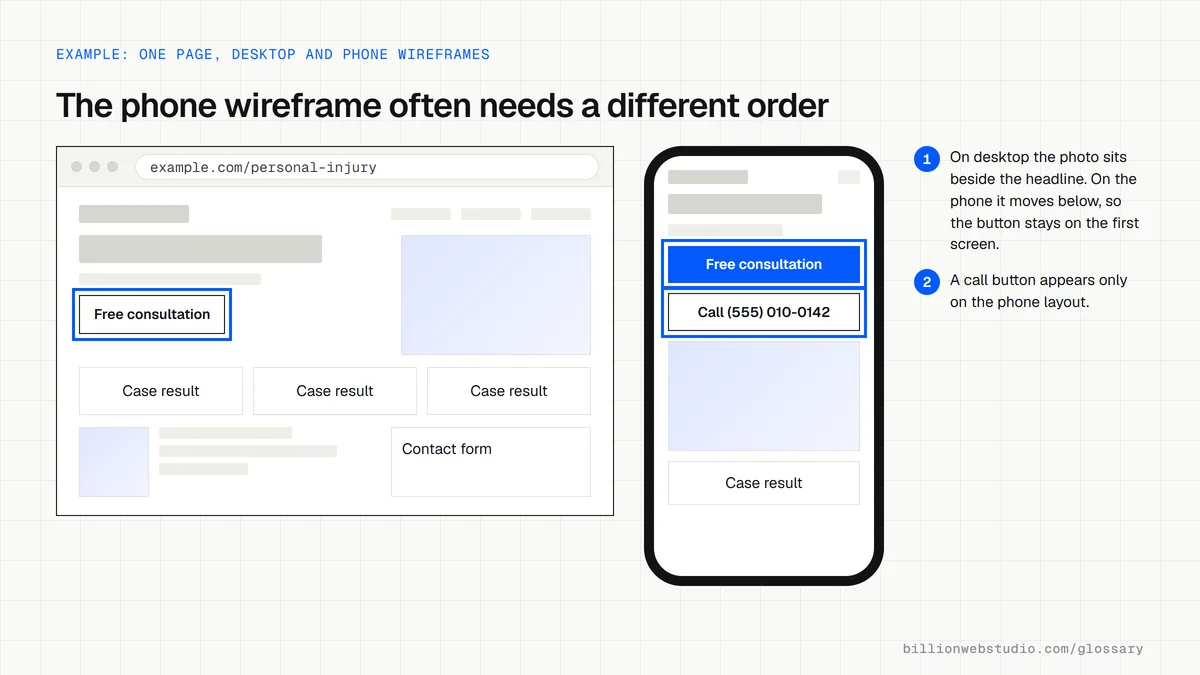
For a law firm's practice area page, the wireframe shows a headline box with a short intro and a free consultation button, then three case result cards, a placeholder for an attorney photo and bio, a list of common questions and a contact form. The firm approves the order and content before the designer adds branding.
Common wireframe mistakes
- Skipping wireframes and going straight to visual design, then reworking finished pages.
- Filling every box with placeholder text, so nobody checks whether the real content fits.
- Wireframing the desktop layout only and leaving the phone layout to chance.
- Approving a wireframe without checking where the main call to action and phone number sit.
- Treating the wireframe as final and refusing changes that later testing shows are needed.
Copy this one-page brief to fill in before each wireframe
PAGE BRIEF: Practice area page, Personal Injury

Goal of the page:      Book a free consultation
Who lands here:        Injured people comparing local firms, mostly on phones
Primary action:        Free consultation button (sticky call button on mobile)
Secondary action:      Call (555) 010-0142

Sections in order:
  1. Headline, one-line promise, consultation button
  2. Three recent case results with amounts
  3. Attorney photo and short bio
  4. How the process works, in 3 steps
  5. Common questions
  6. Contact form with office address and map

Proof we can show:     Reviews, case results, bar membership
Content owner:         Office manager, real copy due before design
Must not appear:       Stock photos of gavels, prices we cannot honor
How to review a wireframe before you approve it
- For each page, write one line saying what a visitor should do there, such as book a consultation, then find that button on the first screen of the wireframe.
- Ask for the phone version of every key page and scroll it top to bottom. Check where the call button, address and main form land.
- Read every heading out loud. Where you see placeholder text, ask who will supply the real words and by when.
- Count the trust signals on the page, such as reviews, case results, licenses or photos of real staff, and check they sit near the main action.
- If the designer shares a clickable prototype, follow the path from the homepage to the inquiry form and note any dead ends.
What good looks like: Every key page has a desktop and a phone wireframe, one clear primary action visible without scrolling, real or near-final headings, and a named owner for each block of content.
Questions to ask your web developer
“How many rounds of wireframe changes are included, and what counts as a change after approval?”
A good answer: A set number of revision rounds is written into the scope, and the proposal explains that moving sections after visual design starts is billed or traded against other work.
“Will the wireframes use our real content or placeholder text?”
A good answer: Real headings, calls to action and approximate text lengths at least, so you can see whether your content fits before design begins. Body copy can follow later.
“Do you wireframe the phone layout separately?”
A good answer: Yes, every key template is drawn at phone width as well as desktop, because most local service visitors arrive on a phone and the section order often differs.
Wireframe: common questions
What is the difference between a wireframe and a mockup?
A wireframe shows structure only: layout, content blocks and priority, usually in grayscale. A mockup is a static visual design that adds real colors, fonts, images and branding. A prototype goes one step further by making the screens clickable, so you can test how the site flows.
Who creates a wireframe?
Usually a UX designer, web designer or content strategist, working from the goals and content agreed with the client. On smaller projects one designer handles both wireframes and visual design. As the business owner, your job is to check the content, priorities and calls to action on each page.
What tools are used to make wireframes?
Common choices include design tools such as Figma, Sketch and Balsamiq, along with plain pen and paper for early sketches. The tool matters less than the result: an agreed layout for every key page before design and development begin.
Want a website that gets this right?
Every Billion Web Studio build includes technical SEO, schema and speed work as standard, with a fixed quote within 1 business day.